
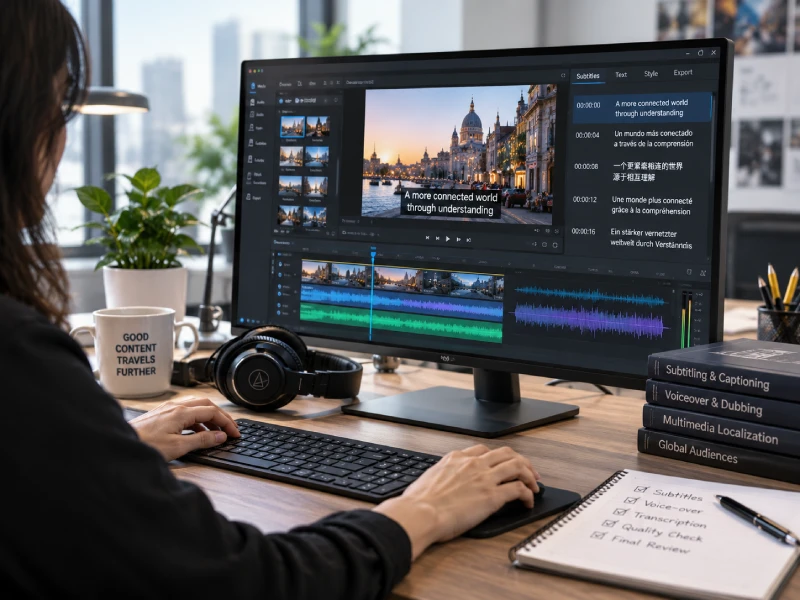
Quick answer: Multimedia localization is the process of adapting video, audio, on-screen text, graphics, timing, and accessibility elements for a specific language and market. It goes beyond translating a script by coordinating subtitles or captions, voice-over or dubbing, visual changes, technical formats, and quality checks so the entire viewing experience feels natural.
Translating a transcript is only one part of preparing media for another audience. Viewers experience words together with voices, captions, graphics, interfaces, sound, timing, and playback. If those layers do not work together, a linguistically correct translation can still feel awkward, obscure important information, or fail in the destination platform.
What Is Multimedia Localization?
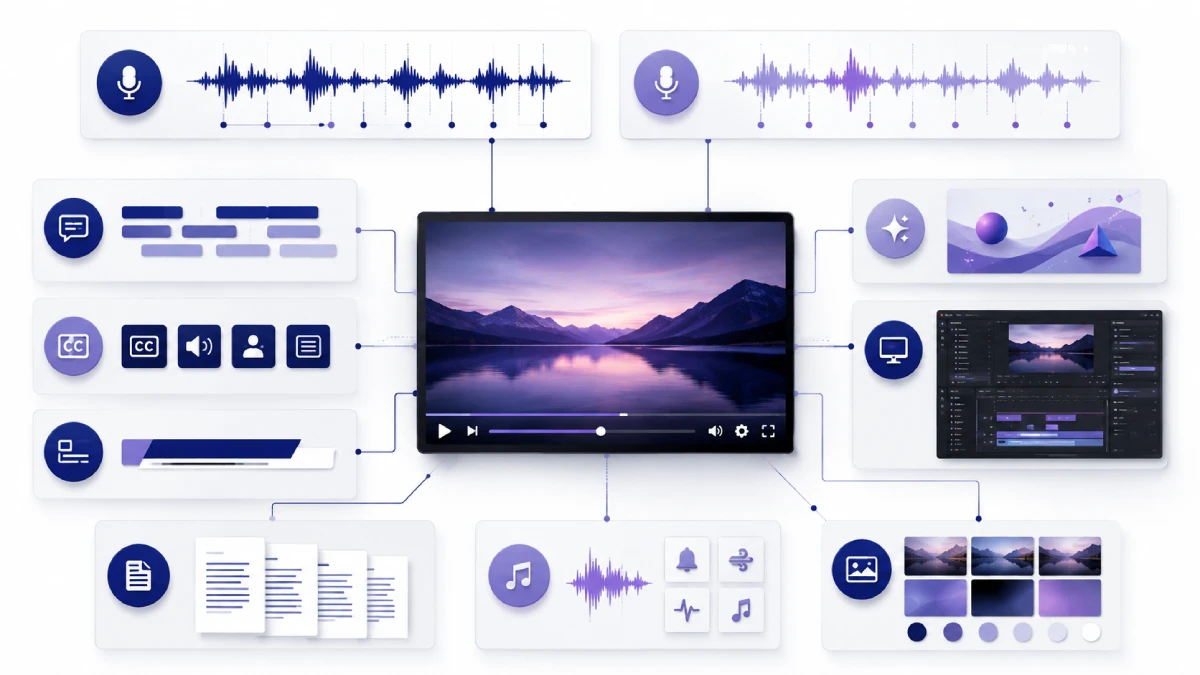
Multimedia localization adapts video, audio, or interactive content for a particular language, locale, audience, or market. Depending on the project, it may include transcription, script adaptation, subtitle timing, captioning, voice recording, audio mixing, on-screen text replacement, metadata localization, accessibility work, and technical delivery.
It overlaps with media localization and audiovisual translation, but it is broader than changing words from one language to another. Multimedia is time-based and layered: dialogue must fit a scene, subtitles must be readable at the right moment, recorded speech must suit the speaker and available time, and localized graphics must fit the frame. The finished files must also render and play correctly.
A document can often be translated and reviewed as a linear text asset. Multimedia is different because several components have to remain synchronized. A subtitle can be linguistically accurate but too dense to read comfortably. A dubbed line can sound natural but run longer than the shot. A translated graphic can be correct but clip because the target language expands. Localization therefore considers how the complete asset behaves, not just what the words mean.
What Types of Content and Elements Can Be Localized?
Multimedia localization is used across marketing, training, product communication, education, entertainment, and internal business communication.
Common content types include:
- Marketing and advertising videos
- Corporate and investor videos
- Product demonstrations
- E-learning courses
- Training materials
- Webinars and recorded events
- Social media videos
- Podcasts
- Software tutorials
- Games and interactive media
- YouTube content
- Internal communications
- Product walkthroughs and recorded user interfaces
The localized elements may include:
- Dialogue and narration
- Subtitles and captions
- On-screen titles and lower thirds
- Graphics, charts, diagrams, and animation
- UI recordings, screenshots, labels, and buttons
- Music cues and relevant non-speech sound information
- Metadata and language labels
- Thumbnails
- Scripts and transcripts
- Audio description and other accessibility elements
Not every project needs every layer. A product tutorial might only require translated subtitles and localized UI screenshots, while a major campaign may require dubbing, animated-text replacement, multiple masters, localized metadata, and platform-specific delivery packages.
Multimedia Translation vs. Multimedia Localization
Multimedia translation usually focuses on converting a script, transcript, subtitle file, or spoken message into another language. Localization asks whether the complete media experience works for the intended audience.
| Area | Multimedia Translation | Multimedia Localization |
|---|---|---|
| Language | Primary deliverable | One component of the project |
| Timing | May be outside scope | Text and speech fit cues, scenes, or animation |
| Visuals | Usually limited | Graphics, UI, lower thirds, and layouts may change |
| Audio | Not inherently included | May include casting, recording, editing, and mixing |
| Culture | Mainly linguistic | Tone, references, examples, and context may be adapted |
| Technical files | Often script-based | Includes media masters, timed text, audio tracks, and source files |
| Accessibility | Not automatic | Captions, transcripts, or audio description may be included |
| QA | Text review | Linguistic, timing, audio, visual, functional, and playback review |
Translation alone may be the correct scope when the required deliverable is only a translated transcript. The distinction is not that localization is always “better”; it is that localization addresses more of the finished media experience when the project requires it.
Main Multimedia Localization Methods
Subtitling
Subtitling displays translated or same-language dialogue as timed text while preserving the original audio. It is often suitable when the audience can comfortably read on screen and preserving the original speaker’s performance matters.
Closed Captions
Closed captions can be switched on or off in a compatible player. In many accessibility workflows, captions include not only dialogue but also speaker identification and meaningful non-speech audio, such as a door slamming or an alarm sounding.
Open captions, sometimes called burned-in captions, are permanently embedded into the picture and cannot be disabled by the viewer.
Terminology varies by region and organization. W3C notes that captions communicate the speech and non-speech audio information needed to understand the content, while the term “subtitles” may be used differently in different markets. Project briefs should therefore define the required viewer experience instead of relying on the label alone.
Voice-Over
Voice-over adds translated speech to the media without necessarily replacing the original performance completely. In UN-style voice-over, the original speaker may remain faintly audible underneath the localized recording.
This approach is common for interviews, webinars, documentaries, product presentations, training, and other content where complete character dubbing is unnecessary.
Dubbing and Lip-Sync Dubbing
Dubbing replaces the original dialogue with localized performances. Depending on the project, synchronization may range from matching the general timing of a scene to adapting wording, delivery, pauses, and performance closely to visible mouth movements.
Lip-sync dubbing is more production-intensive because translators, adaptors, directors, and voice performers have less freedom over phrase length and rhythm.
Audio Description
Audio description communicates essential visual information that is not available through the main audio. This can include actions, visual changes, facial expressions, or important text displayed on screen when that information is necessary to understand the content.
Transcripts and On-Screen Text Replacement
Projects may also require source transcripts, translated transcripts, descriptive transcripts, localized lower thirds, graphics, product interfaces, charts, animated text, metadata, and thumbnails.
Subtitling vs. Dubbing vs. Voice-Over
No single method is best for every project. The decision depends on audience expectations, platform, accessibility, production value, source material, budget, deadline, and whether the original speaker’s voice should remain part of the experience.
| Factor | Subtitling | Voice-Over | Dubbing |
|---|---|---|---|
| Cost factors | Usually fewer production stages, but timing, formatting, and QA still matter | Adds casting, recording, editing, timing, and mixing | Adds performance adaptation, synchronization, retakes, and more extensive mixing |
| Production complexity | Low to medium | Medium to high | High, especially with lip-sync or many speakers |
| Viewer experience | Original voices remain while viewers read | Viewers hear translated speech, sometimes over the original | Localized performances replace the original dialogue |
| Original voice preservation | Preserved | May be partly preserved | Usually replaced |
| Visual synchronization | Subtitle cues align with speech and scenes | Usually phrase- or scene-level | May require close timing and mouth synchronization |
| Best use cases | Training, interviews, social media, broad language coverage | Tutorials, webinars, product videos, factual content | Campaigns, entertainment, children’s content, character-led media |
| Limitations | Adds reading effort and may compete with dense visuals | Can feel less immersive and requires careful audio mixing | More approvals, rights management, and production coordination |
These are relative production tendencies, not universal price rules. A highly technical subtitling project with poor source audio, complex captions, several output specifications, and heavy review can require substantial work.
Hybrid approaches are also common. A company may dub a priority market, use voice-over for training, and rely on subtitles for additional languages. Another project may combine localized narration with translated captions and recreated on-screen graphics.
The Multimedia Localization Process
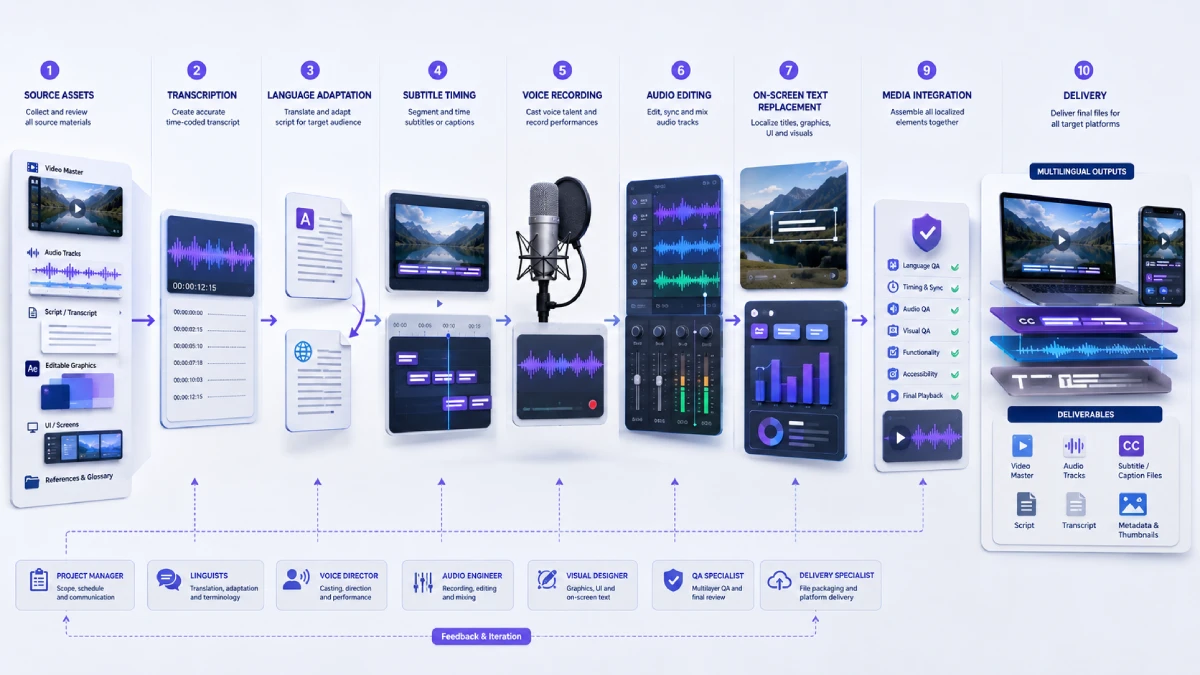
A controlled video localization process normally includes the following stages.
- Asset collection: Gather the final video, high-quality audio, scripts, project files, reference material, terminology, and delivery brief.
- Technical review: Identify speakers, embedded text, source quality issues, missing assets, target platforms, accessibility requirements, and required outputs.
- Transcription: Create or correct an accurate, time-coded source transcript when one is not available.
- Script preparation: Organize speakers, terminology, pronunciation notes, timestamps, and production instructions.
- Translation and adaptation: Adapt meaning, tone, cultural references, and spoken length for the target audience.
- Timing and segmentation: Build subtitle cues or define recording-length targets for localized speech.
- Voice casting and recording: Select suitable voices, direct performances, and manage multi-speaker sessions where required.
- Audio editing and mixing: Clean recordings, select takes, align dialogue, and prepare the localized mix.
- On-screen text adaptation: Replace titles, lower thirds, UI text, charts, graphics, and animation.
- Integration: Assemble localized audio, subtitles, captions, visuals, metadata, and media versions.
- Linguistic and technical QA: Review language, pronunciation, timing, audio, visual presentation, rendering, and functionality.
- Final delivery: Supply approved video masters, audio tracks, subtitle files, scripts, transcripts, and other requested deliverables.
Approval gates matter. Terminology and pronunciation should be resolved early, and translated recording scripts should normally be approved before final voice recording. Otherwise, late script changes can create avoidable retakes, re-editing, and synchronization work.
Script Translation and Adaptation
Spoken language is not simply written language read aloud. A sentence that looks natural on a page can sound formal, repetitive, or difficult to perform when spoken.
Script adaptation considers:
- Natural spoken rhythm
- Available timing
- Tone and brand voice
- Audience knowledge
- Product terminology
- Names and abbreviations
- Numbers and measurements
- Cultural references
- Pronunciation
- Performance cues
- Speaker personality
- Recording-length constraints
Literal translation is especially risky when the localized line must fit a fixed visual sequence. The translator or adaptor may need to restructure a sentence while preserving the meaning, emphasis, and intent.
Pronunciation decisions should also be settled before recording. Brand names, people, locations, acronyms, technical terms, and product names may require written phonetic notes or reference audio.
Subtitle and Caption Localization
Subtitle localization is both a linguistic and timing task. The wording must communicate the message clearly while fitting the screen, the available cue time, and the visual context.
Important factors include:
- Reading speed
- Line length
- Segmentation
- Cue timing
- Shot changes
- Speaker identification
- Relevant sound cues
- Caption positioning
- Overlap with lower thirds or UI
- Language-specific punctuation and spacing
- Mobile viewing
- Burned-in versus selectable subtitles
- Destination-platform specifications
There is no single worldwide rule for characters per line, reading speed, or cue duration. Requirements depend on the language, audience, content, broadcaster, platform, and client specification. For example, Netflix maintains general and language-specific timed-text style guides, but those rules should not automatically be applied to corporate training, YouTube, an LMS, or another publisher.
The same caution applies to subtitle positioning. Text may need to move to avoid a speaker label, product control, chart, lower third, or other essential information. A technically valid subtitle file can still create a poor viewing experience if it covers the content the viewer needs to see.
Dubbing and Voice-Over Production
Voice production involves more than reading a translated script into a microphone.
Depending on the project, the workflow may include:
- Voice casting
- Auditions
- Pronunciation guides
- Recording-script adaptation
- Character or narrator consistency
- Recording direction
- Phrase synchronization
- Lip synchronization
- Multiple-speaker management
- Retakes
- Dialogue editing
- Noise cleanup
- Music and effects integration
- Final mixing
A product tutorial may need a clear, neutral narrator whose pacing follows an interface demonstration. A character-led video may require performers whose delivery matches emotion, personality, and visible action.
Synthetic voices can be useful in some workflows, including drafts, internal material, high-volume updates, or selected production scenarios. However, AI-generated speech should not be treated as a replacement for production governance. Consent, licensing, voice cloning, reuse, confidentiality, pronunciation, brand suitability, and platform disclosure rules may all need review.
The appropriate controls depend on the voice source, contract, platform, region, and intended use. Human review remains important for terminology, pacing, naturalness, consistency, and overall audience experience.
On-Screen Text, Graphics, and UI Recordings
Subtitles do not solve text that is already embedded in the picture.
Multimedia projects may contain:
- Titles
- Lower thirds
- Product labels
- Charts
- Infographics
- Animated callouts
- Presentation slides
- Software menus
- App interfaces
- Screen recordings
- Buttons and navigation
- Text inside illustrations
Editable source files make localization more controllable. Designers can change line breaks, text boxes, animation timing, hierarchy, and positioning instead of trying to rebuild flattened elements from a finished video.
Text expansion is another consideration. A target-language phrase may occupy more or less space than the source. Right-to-left languages can require changes to alignment, reading order, animation direction, and interface layout. Fonts must also support the required characters and be properly licensed for the project.
Accessibility in Multimedia Localization
Accessibility should be planned as part of the viewing experience rather than added at the end.
Captions may communicate:
- Spoken dialogue
- Speaker identity when it is not obvious visually
- Meaningful sound effects
- Relevant music information
- Other audio needed to understand the scene
Audio description can provide essential visual information that the main soundtrack does not convey. Transcripts can provide another way to consume or review the material, while descriptive transcripts can combine spoken and significant visual information.
The W3C Web Content Accessibility Guidelines include separate success criteria for prerecorded captions, live captions, and audio description. Which requirements apply to a specific business depends on the content, region, platform, contractual obligations, and organizational policies. Multimedia teams should treat accessibility requirements as a project specification and obtain appropriate legal or accessibility advice where necessary.
Readability also depends on presentation. Caption contrast, placement, font rendering, player controls, and mobile playback should be checked in the destination environment.
Multimedia Localization Quality Assurance
Quality assurance should cover the finished media, not just the translated text.
| QA Area | What to Check |
|---|---|
| Linguistic QA | Meaning, completeness, grammar, terminology, tone, names, numbers, and consistency |
| Pronunciation QA | People, places, products, acronyms, and technical terminology |
| Timing QA | Subtitle cues, segmentation, voice timing, synchronization, and scene changes |
| Audio QA | Clarity, noise, edits, levels, music balance, channel integrity, and unwanted artifacts |
| Visual QA | On-screen text, layout, clipping, text expansion, RTL behavior, and subtitle obstruction |
| Functional QA | Language labels, track selection, metadata, file naming, encoding, and player behavior |
| Final playback | Start-to-finish review of the assembled deliverable in the intended environment |
A subtitle file may look correct in an editor and still render unexpectedly in a particular player. A voice recording may sound good in isolation but compete with background music in the final mix. A graphics file may appear correct on desktop but become difficult to read on a phone.
That is why final playback review is a separate step.
Common File Formats and Deliverables
A multimedia localization project may involve several categories of files rather than one universal package.
Source materials can include:
- Video masters
- High-quality audio files
- Dialogue, music, and effects stems
- Editing timelines
- Animation and design files
- Fonts and linked assets
- Source scripts and transcripts
Timed-text deliverables may include SRT, WebVTT, or TTML-derived formats such as IMSC profiles, depending on the destination.
WebVTT is designed for timed text associated with media, including captions, subtitles, descriptions, chapters, and metadata. W3C published IMSC Text Profile 1.3 as a Recommendation in May 2026 for interoperable timed-text workflows.
However, the destination specification should determine the actual format. YouTube, Vimeo, LinkedIn, learning platforms, broadcasters, and private video systems do not necessarily accept the same files or expose the same caption, audio-track, and styling capabilities.
Final deliverables may therefore include:
- Localized video masters
- Separate localized audio tracks
- Subtitle or caption files
- Burned-in versions
- Scripts and transcripts
- Localized metadata
- Localized thumbnails
- Editable project files
- QA reports
- Delivery manifests
What Affects Multimedia Localization Cost and Timeline?
Runtime matters, but it is only one part of the scope.
Cost and timeline are also influenced by:
- Number of source assets
- Number of languages and locale variants
- Transcript accuracy
- Audio quality
- Subject complexity
- Dialogue density
- Number of speakers
- Subtitle, voice-over, or dubbing method
- Voice casting and auditions
- Lip-sync requirements
- Retakes
- On-screen graphics and animation
- UI replacement
- Clean-master and audio-stem availability
- Editable source-file availability
- Accessibility requirements
- Review rounds
- Number of stakeholders
- Rights and security requirements
- Delivery formats
- Number of destination platforms
- Deadline and versioning requirements
A short lip-synced campaign with several speakers and animated graphics may involve more production work than a much longer narrated presentation. For this reason, a reliable quotation or schedule should be based on the actual assets and delivery requirements rather than a universal per-minute assumption.
How to Choose the Right Localization Method
A practical decision starts with the purpose of the content rather than with a preferred production technique.
Consider:
- Content purpose
- Target audience
- Publishing platform
- Budget
- Brand importance
- Accessibility requirements
- Viewing environment
- Need to preserve the original voices
- Number of target markets
As a general decision framework:
- Choose subtitles when preserving the original performance and supporting multiple languages efficiently are priorities.
- Consider voice-over when viewers should hear localized speech but close mouth synchronization is unnecessary.
- Consider dubbing when a fully localized spoken experience is important.
- Consider lip-sync dubbing when visible speech is prominent and close synchronization adds meaningful value.
- Scope captions when viewers need dialogue plus meaningful audio information.
- Scope audio description or descriptive transcripts when essential visual information needs an alternative.
- Consider a hybrid model when priority markets justify higher-production localization while other markets can be supported with subtitles.
Do not make the decision solely on assumptions about a country’s preferences. Audience, content type, platform behavior, and brand objectives are more useful inputs.
How to Prepare Multimedia Files for Localization
A well-organized handoff gives language and production teams the context they need before work starts.
Prepare:
- Final source video
- Highest-quality available audio
- Clean or textless master where available
- Separate dialogue, music, and effects stems where available
- Editable video, animation, graphics, and UI files
- Required fonts and font-license information
- Accurate time-coded script or transcript
- Speaker names and roles
- Pronunciation guide
- Approved glossary
- Style and brand-voice guidance
- Product and interface terminology
- List of on-screen text and lower thirds
- Target languages and locale variants
- Intended audience
- Target publishing platforms
- Required aspect ratios and output formats
- Accessibility requirements
- Caption-position restrictions
- Music, footage, font, performer, and synthetic-voice rights information
- Reviewers and final approver
- Required review rounds
- Deadline
- File-naming and version-control rules
The more complete the source package is, the easier it is to avoid transcript corrections, graphic reconstruction, pronunciation retakes, version confusion, and wrong-format delivery.
Common Multimedia Localization Mistakes
1. Translating a Script Without Accounting for Timing
A good written translation may still be unsuitable for subtitles or voice recording if it does not fit the available time.
2. Ignoring On-Screen Text
The spoken content may be localized while titles, charts, labels, or software interfaces remain in the source language.
3. Building Subtitles from an Inaccurate Transcript
Transcription errors can propagate into translation, captions, dubbing scripts, and final audio.
4. Failing to Provide Pronunciation Guidance
Brand names, people, places, acronyms, and technical terms can trigger costly or disruptive retakes when pronunciation is decided too late.
5. Treating Captions and Subtitles as Identical
Translated dialogue alone may not meet a project’s requirement for speaker identification or meaningful non-speech audio information.
6. Recording Before the Script Is Approved
Late wording changes can affect voice files, timing, editing, mixing, and graphics.
7. Ignoring Text Expansion and Reading Direction
Localized graphics may clip, wrap badly, or lose their visual hierarchy. Right-to-left languages may require deeper layout changes.
8. Forgetting Mobile Viewing
Captions and graphics that work on a desktop monitor may feel crowded or become obstructed by mobile-player controls.
9. Using Synthetic Voices Without Appropriate Governance
The project still needs decisions about consent, reuse, security, disclosure, pronunciation, and brand fit.
10. Delivering the Wrong Subtitle or Media Format
Correct language is not useful if the destination system cannot import, select, render, or play the file correctly.
FAQ
What is an example of multimedia localization?
A software training video may require transcript correction, script translation, localized narration, captions, translated interface labels, localized graphics, and final testing inside the learning platform. The language, audio, visuals, timing, and technical delivery all form part of the localized experience.
What is the difference between video translation and localization?
Video translation changes spoken or written content from one language to another. Video localization can also adapt timing, voice performances, subtitles, captions, on-screen graphics, cultural references, accessibility elements, metadata, file formats, and playback requirements.
Is subtitling cheaper than dubbing?
Subtitling often involves fewer production stages than dubbing, but there is no universal price rule. Transcript quality, language, timing, caption requirements, review rounds, synchronization, formats, and delivery specifications all affect the final scope.
What is the difference between captions and subtitles?
Translated subtitles commonly present dialogue in another language. Captions may also identify speakers and communicate relevant non-speech sounds for viewers who cannot hear the audio. Terminology varies by region and platform, so the required viewer experience should be defined in the project brief.
How long does multimedia localization take?
There is no fixed turnaround. Runtime, number of languages, transcript quality, speakers, localization method, graphics, lip-sync requirements, source-file availability, approvals, delivery formats, and deadline all influence the production schedule.
Can AI be used for video localization?
Yes. AI can assist with transcription, translation drafts, subtitle timing, synthetic speech, and quality checks. Appropriate human review and controls are still needed for accuracy, confidentiality, consent, licensing, pronunciation, disclosure, and brand suitability.
What files are needed for video localization?
At minimum, provide the final source video, good-quality audio, and an accurate script or transcript. Editable graphics, audio stems, pronunciation guidance, terminology, platform specifications, rights information, and clear review responsibilities provide better production control.
Should a business choose subtitles, voice-over, or dubbing?
The choice depends on content purpose, audience, platform, budget, brand importance, accessibility, viewing environment, number of markets, and whether the original voices should be preserved. Subtitles retain the original performance, voice-over adds localized speech, and dubbing replaces the spoken experience.
Multimedia Localization Is a Coordinated Media Workflow
Multimedia localization works best when language, sound, visuals, timing, accessibility, and technical delivery are planned together. The objective is not simply to replace one language with another, but to create media that remains clear, natural, usable, and technically appropriate for the target audience.
For businesses, the most important decisions happen before production begins: what needs to be localized, which method suits each audience, what source assets are available, what accessibility experience is required, who will approve terminology and scripts, and where the finished content will be published.
When those decisions are defined early, subtitles, voice performances, graphics, audio, and delivery files can be built as parts of one coordinated workflow rather than as separate fixes at the end of production.