

Expanding into a new market involves more than making a website readable in another language. A visitor may understand translated copy and still encounter the wrong currency, unfamiliar terminology, untranslated form errors, unavailable payment methods, broken layouts, or pages that local search engines cannot properly discover.
That is why website localization should be treated as a coordinated business, language, UX, technical, and SEO process. The objective is to create a market-specific website experience that users can find, understand, trust, and use from the first search result through enquiry, purchase, or support.
Quick Answer: What Is Website Localization?
Website localization is the process of adapting a website for a specific language and market. It includes translating and rewriting content, adjusting design, forms, images, regional formats, legal and commercial information, configuring locale-specific URLs and SEO, and testing the complete experience so local users can find, understand, trust, and use the site.
Translation is an important part of localization, but it is not the entire job. Website localization also considers how the site behaves, how information is presented, how people search, and whether the business can support the localized customer journey.
What Is Website Localization?
Website localization adapts an existing website for a defined locale or target market. A locale usually combines language with regional requirements such as terminology, formatting conventions, commercial practices, and user expectations.
The goal is not to reproduce the source website word for word. It is to make the website work naturally for the target audience. That may require changes to navigation, product descriptions, calls to action, imagery, dates, measurements, checkout options, legal information, contact details, search keywords, and technical implementation.
A successful localized website should help local users complete the intended journey. They should be able to discover relevant pages in search, understand the offer, navigate the site, submit forms, purchase products where applicable, and receive appropriate follow-up communication.
This is why website localization sits at the intersection of four disciplines:
- Language: meaning, terminology, tone, readability, and market-specific wording.
- User experience: navigation, forms, layouts, imagery, calls to action, and customer journeys.
- Technology: CMS fields, code, integrations, scripts, routing, and locale-aware formatting.
- SEO: local keyword research, URLs, metadata, internal linking, indexability, and international targeting.
The W3C Internationalization guidance also distinguishes localization from internationalization, reinforcing that multilingual websites require both content adaptation and technical readiness.
Website Translation vs Website Localization
Professional website translation transfers the meaning of written content into another language. Website localization builds on that work by adapting the wider digital experience for a particular market.
| Area | Website Translation | Website Localization |
|---|---|---|
| Scope | Mainly written content | Content, UX, technology, commerce, and search |
| Content elements | Selected page copy and assets | Copy, hidden strings, forms, emails, media, and metadata |
| Market adaptation | Limited unless specifically requested | Terminology, messaging, products, formats, and local conventions |
| Technical work | Files or CMS fields | May include i18n, routing, integrations, and template changes |
| SEO | Translated titles or metadata | Local keywords, locale URLs, hreflang, internal links, and indexability |
| Testing | Linguistic review | Linguistic, visual, functional, SEO, and accessibility QA |
| Maintenance | Periodic translation updates | Ongoing synchronization and market governance |
| Typical use cases | Low-risk informational content | Lead-generation sites, ecommerce, SaaS, portals, and market launches |
Translation alone may be enough for a small informational microsite, internal resource, or limited document library where users only need basic comprehension.
Full localization becomes more important when a website generates leads, processes transactions, contains customer accounts, supports region-specific products, or plays a major role in international marketing. In these cases, language translation solutions support the linguistic layer, while the website still requires technical, UX, SEO, and market planning.
Website Localization vs Internationalization
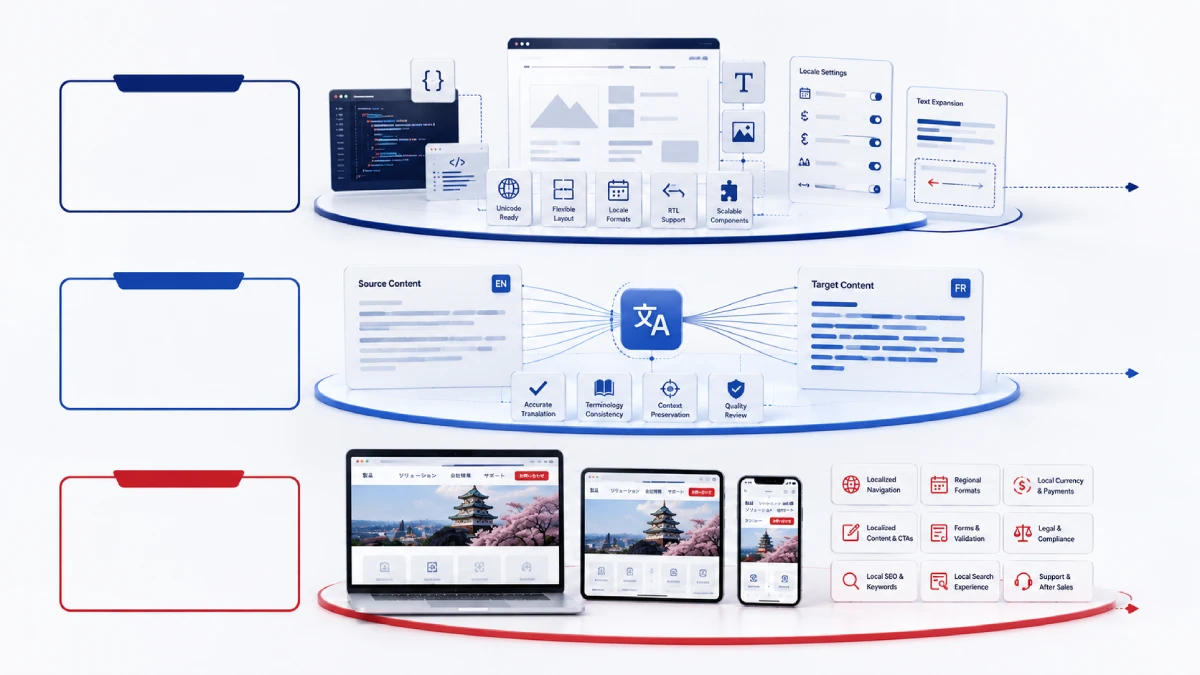
Internationalization, often abbreviated as i18n, is the design and development work that makes a website capable of supporting different languages, scripts, formats, and locale-specific behavior without rebuilding the system for every market.
Localization, or l10n, is the subsequent adaptation of that system for a particular language and market.
A simple way to understand the relationship is:
- Internationalization prepares the system.
- Translation transfers the meaning.
- Localization adapts the complete market experience.
Internationalization ideally begins during design and development. It may involve separating user-facing strings from source code, using Unicode, allowing layouts to expand, supporting right-to-left scripts, handling plural forms, and formatting dates, numbers, currencies, and addresses according to locale.
Legacy websites can still be localized, but weak internationalization usually creates additional engineering work. Common problems include hard-coded strings, text assembled from sentence fragments, fixed-width buttons, text embedded in images, unsupported fonts, assumptions about name or address order, and themes or plugins that do not expose strings for translation.
This technical layer becomes especially important when a website includes dashboards, user accounts, or application-style interfaces. In those cases, the work may overlap with app and software localization.
What Elements of a Website Need Localization?
A reliable localization scope goes far beyond the visible paragraphs on a page. Businesses should inventory both customer-facing and system-generated content.
Navigation and Page Content
Localize main navigation, menus, breadcrumbs, page copy, headings, buttons, calls to action, footers, pop-ups, tooltips, downloadable documents, product categories, and other reusable components.
Forms, Search, and System Messages
Forms frequently reveal localization gaps. Review field labels, placeholder text, required-field instructions, validation errors, confirmation messages, account notifications, site search, filters, login screens, cookie interfaces, and customer-support flows.
Transactional emails and system notifications should also be included. A localized landing page followed by a source-language confirmation email creates an inconsistent customer experience.
Images, Graphics, Video, and Audio
Check text embedded in images, diagrams, screenshots, icons, image alt text, captions, subtitles, transcripts, voice-over, and thumbnail text. Visuals may also contain cultural assumptions that do not fit every market.
Regional and Commercial Information
Localization may affect dates, time zones, currencies, number formats, measurements, address formats, phone numbers, product availability, pricing, shipping information, returns, and payment methods.
Unicode CLDR provides standardized locale data for areas such as dates, numbers, currencies, units, and plural rules. It should not be confused with systems that determine exchange rates, taxes, or actual market pricing.
Search, Legal, and Technical Elements
Titles, meta descriptions, URLs, internal links, structured data, hreflang, canonical tags, XML sitemaps, privacy notices, cookie information, terms and conditions, and market-specific disclaimers may all require localization or market-level validation.
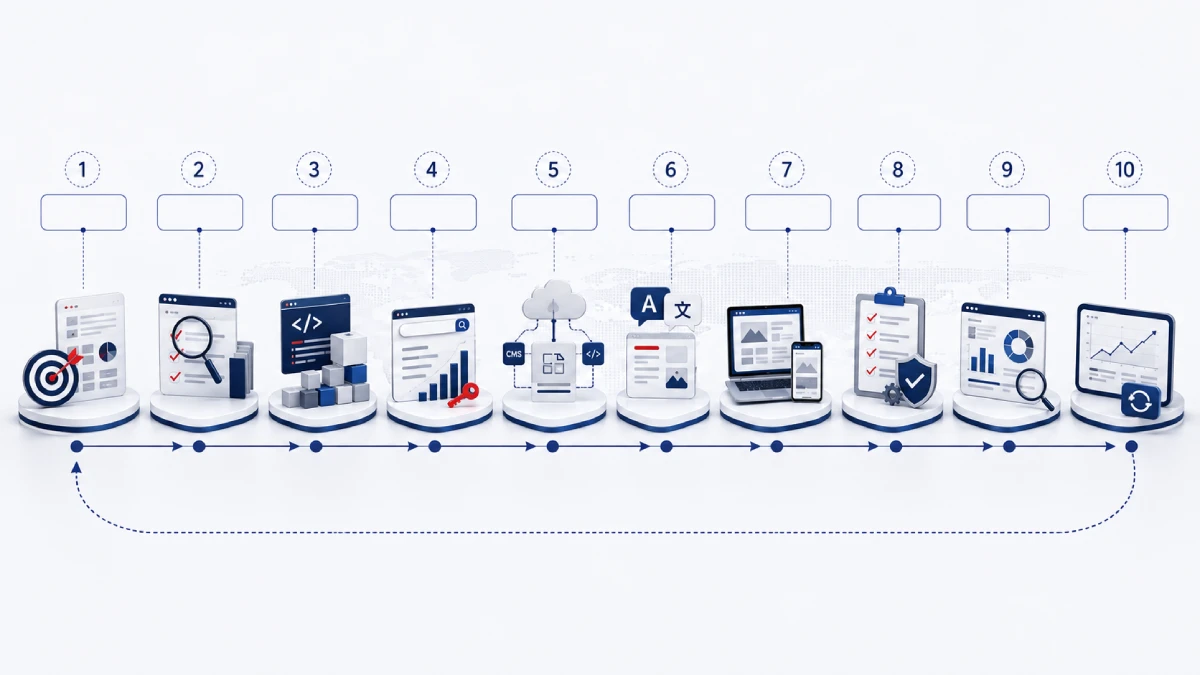
The Website Localization Process: 10 Steps
A structured process reduces rework and makes ownership clearer across marketing, localization, development, and SEO teams.
1. Define Markets, Locales, and Success Criteria
Start by deciding which markets the business actually intends to support. Define target countries, languages, scripts, regional variants, audience segments, products, customer journeys, and business objectives.
Avoid treating language as the only variable. Two markets using Spanish, English, Chinese, or Arabic may still require different terminology, keywords, legal information, product availability, or conversion journeys.
2. Audit Website Content and Technology
Inventory URLs, templates, CMS content types, reusable components, forms, product feeds, downloadable files, media, transactional emails, plugins, and third-party systems.
Classify content as global, translatable, market-adaptable, market-specific, excluded, or retired. This prevents teams from translating unnecessary pages while missing hidden but important content.
3. Assess Internationalization Readiness
Test string extraction, font support, text expansion, right-to-left behavior, plural handling, locale-aware formatting, form input, search behavior, CMS locale support, URL routing, and fallback rules.
Turn technical findings into a remediation backlog. Translation should not be expected to solve code or layout problems.
4. Perform Local Keyword Research and Build Language Resources
Research how users search in the target market rather than translating the source keyword list directly. Map local search intent to pages and identify where the target market needs different content priorities.
At the same time, prepare a glossary, style guide, brand terminology, non-translatable terms, reviewer instructions, and any available translation memory.
5. Select the Content Extraction and Delivery Workflow
Decide how content will move from the website or CMS into the localization workflow and back again. Define content identifiers, context, permissions, version control, change detection, preview requirements, and approval stages.
6. Translate and Adapt Content for the Market
Translate accurately while adapting terminology, tone, examples, calls to action, commercial details, and search terms where required.
The review model should reflect content risk. A product-category page, legal notice, checkout message, and general blog post may not require the same level of review.
7. Integrate and Review Content in Context
Localized content may return through a CMS import, API, connector, repository merge, or manual reintegration. Review it on realistic desktop and mobile previews so language specialists can see the content alongside images, buttons, forms, and surrounding components.
8. Conduct Linguistic, Functional, and Accessibility QA
Test accuracy, terminology, completeness, layout, navigation, forms, search, checkout, account features, device behavior, and accessibility. Record defects by severity and route them to the correct owner.
9. Validate Multilingual SEO and Launch Readiness
Check locale-specific URLs, HTTP status codes, titles, descriptions, hreflang, canonical tags, internal links, XML sitemaps, robots directives, structured data, rendered JavaScript, analytics, and consent settings.
Staging restrictions such as noindex directives should be removed only when the site is approved for production.
10. Launch, Monitor, and Maintain Continuous Updates
After launch, monitor indexing, search queries, localized traffic, conversions, support requests, and quality defects. Establish a process for new source content, translation updates, terminology changes, retired pages, and regression testing.
Localization should become part of the website’s ongoing content operations rather than ending at launch.
Website Localization Technology and Delivery Models
There is no single correct technical workflow. The right model depends on site architecture, update frequency, development resources, number of locales, SEO control, security requirements, and long-term content ownership.
| Delivery model | Best fit | Main advantage | Main limitation |
|---|---|---|---|
| Manual file export and import | Small or infrequently updated websites | Low initial integration effort | Manual version control and reintegration risk |
| Native CMS localization | Editorial teams managing locales directly in the CMS | Centralized publishing | Capability depends on content models, themes, plugins, and fallback rules |
| TMS connector | Recurring multilingual content across multiple locales | Automated content transfer and workflow status | Connector support and content coverage vary |
| API-based workflow | Headless CMSs and custom platforms | Flexible automation and integration | Requires engineering, monitoring, and error handling |
| Repository workflow | Static sites, web apps, and release-driven environments | Fits development and CI/CD workflows | Translators may receive limited visual context |
| Proxy-based solution | Sites that are difficult to integrate directly | Can reduce source-system changes | SEO, performance, portability, security, and ownership need evaluation |
| Continuous localization | Frequently changing multilingual sites | Creates repeatable update flows | Requires strong governance and release rules |
Continuous localization is best understood as an operating model rather than a single platform. It can be implemented through connectors, APIs, repositories, or other controlled workflows.
When comparing options, evaluate website size, update frequency, CMS architecture, security, SEO control, preview requirements, ownership, rollback capability, and the ability to maintain the system after launch.
Multilingual SEO for Localized Websites
Multilingual SEO begins with the target market, not with translation of the source site’s keyword list.
Research Market-Specific Search Demand
A linguistically correct keyword can still be a poor search target. Local customers may use different product names, abbreviations, modifiers, or commercial terminology.
Research local search behavior and map each target query to a suitable page. Some source pages may have little demand in the new market, while completely new local pages may be justified.
Use Stable Locale-Specific URLs
Google recommends separate URLs for different language versions rather than changing the language of a single URL based only on cookies or browser settings. Country-code domains, subdomains, and subdirectories can all be viable depending on governance, technical resources, and long-term maintenance. See Google’s international and multilingual site guidance.
Do not choose URL architecture based on the assumption that one structure always ranks better. The organization must be able to maintain whichever model it adopts.
Implement Hreflang Correctly
Hreflang helps Google understand alternate language or regional versions of a page. Each page in a cluster should reference itself and its corresponding alternates, and the annotations should be reciprocal.
Use valid language and optional region identifiers, fully qualified URLs, and consistent clusters. An x-default version can be useful for a global selector or fallback page, but it is not mandatory for every site.
Google supports hreflang in HTML, HTTP headers, or XML sitemaps. Implementing all three does not provide an SEO advantage and can create unnecessary maintenance risk. Refer to Google’s current localized versions documentation when configuring production pages.
Coordinate Hreflang and Canonical Tags
A genuinely translated, indexable locale page will normally use a self-referencing canonical. Do not canonical every localized page to the source-language version simply because the original content was created there.
For closely duplicated regional pages in the same language, canonical and hreflang decisions should be coordinated carefully. Google recommends selecting a canonical in the same language where possible.
Localize On-Page Search Elements
Localize page titles, meta descriptions, headings, URL slugs where appropriate, image alt text, breadcrumbs, internal anchor text, product attributes, and structured data.
Metadata should reflect the same local search intent as the visible page rather than being translated separately with no relationship to the content.
Protect Crawlability and Indexability
Verify that localized pages return appropriate status codes, important content appears in rendered HTML, language selectors use crawlable links, XML sitemaps include the correct locale URLs, and robots or noindex directives do not block intended pages.
Google can render JavaScript, but crawling, rendering, and indexing are separate processes. Important localized content and navigation should therefore be validated in the rendered result, particularly on JavaScript-heavy websites.
Keep Language Selection Under User Control
Browser language or IP data can support a suggestion or remembered preference, but users should still be able to access and switch between versions. Avoid forced redirects that prevent crawlers or users from reaching other locale URLs.
A visible language selector with clear language labels and crawlable links is usually more robust than relying entirely on automatic detection.
Build Local Authority
Localized content still needs credibility. Regional partnerships, relevant directories, local industry publications, market-specific case studies, useful resources, and appropriate backlinks can support authority in the target market.
Translation alone does not create local search visibility.
Website Localization Testing
Testing should evaluate the complete user experience rather than only a translated document.
| Test area | What to verify |
|---|---|
| Linguistic QA | Accuracy, terminology, grammar, tone, completeness, variables, and untranslated strings |
| In-context review | Meaning in the actual component, CTA wording, hierarchy, truncation, and market suitability |
| Functional QA | Navigation, forms, validation, search, login, downloads, checkout, emails, and integrations |
| Layout and responsive QA | Text expansion, fonts, line breaks, overlap, mobile menus, tables, modals, and RTL behavior |
| Browser and device QA | Priority browsers and devices based on analytics and target-market usage |
| SEO QA | Status codes, metadata, hreflang, canonical tags, sitemaps, indexability, and rendered content |
| Accessibility QA | Page language, form labels, keyboard use, error identification, captions, alternative text, and directionality |
The HTML lang attribute is still important for browsers, assistive technologies, and pronunciation even though Google does not use it alone to determine a page’s search language.
A formal localization quality management process should define severity levels, acceptance criteria, review ownership, and the evidence required before launch.
Website Localization Roles and Responsibilities
Localization crosses departmental boundaries, so ownership should be explicit.
| Role | Primary responsibility |
|---|---|
| Client content owner | Approves source content, scope, and business meaning |
| Localization project manager | Coordinates workflow, versions, queries, and stakeholders |
| Translator or localizer | Translates and adapts content for the target locale |
| Linguistic reviewer | Reviews terminology, style, accuracy, and completeness |
| In-country reviewer | Confirms local market suitability and business terminology |
| Developer or localization engineer | Handles internationalization, extraction, integration, and technical defects |
| SEO specialist | Performs keyword research and validates international SEO |
| QA specialist | Tests linguistic, visual, functional, and technical behavior |
| Legal or compliance reviewer | Reviews market-specific regulatory, privacy, or contractual content |
| Market owner | Gives final approval for market launch |
Not every project needs a separate person for every role, but every responsibility needs an owner.
What Affects Website Localization Cost?
There is no reliable universal price for localizing a website. A responsible estimate starts with project scope.
Major cost factors include:
- Total word count and number of pages.
- Number of languages and regional variants.
- Repeated content and available translation memory.
- Subject-matter complexity.
- Existing terminology and style resources.
- CMS structure and technical readiness.
- Engineering or internationalization work.
- Keyword research and multilingual SEO requirements.
- Images, video, audio, and downloadable files.
- Testing depth and supported devices.
- In-country, legal, or compliance review.
- Update frequency and release cadence.
- Number of stakeholders and approval rounds.
- Deadline and source changes during production.
A low translation rate does not necessarily create the lowest total project cost. Hard-coded strings, poor source content, weak integrations, and late revisions often create more expensive rework.
Businesses evaluating website localization services should therefore prepare a content inventory, technology overview, target locale list, review model, and release expectations before requesting a formal scope.
How Long Does Website Localization Take?
There is no meaningful standard timeline for all websites. A small static site differs substantially from an ecommerce platform containing thousands of products, user accounts, payment functions, and recurring content updates.
A practical schedule should be divided into milestones:
- Discovery and scope.
- Content and technical audit.
- Internationalization remediation.
- Keyword and terminology preparation.
- Translation and market adaptation.
- Integration.
- QA and correction.
- SEO validation.
- Launch preparation.
- Monitoring.
The main dependencies are source-content readiness, website size, number of locales, technical debt, reviewer availability, legal approval, source changes during production, and defect-resolution speed.
For large programs, a phased launch may be safer than attempting to publish every page in every market simultaneously.
Common Website Localization Mistakes
Translating Keywords Directly
Search behavior does not always follow dictionary equivalents. Keyword choices should be based on local search demand and intent.
Localizing Only Visible Page Text
Forms, validation errors, emails, cookie interfaces, site search, filters, PDFs, structured data, and account messages are commonly missed.
Treating One Language as One Market
A single Spanish, English, Arabic, or Chinese version may not meet the needs of every region using that language. Search terminology, laws, products, payments, and customer expectations can differ significantly.
Market-specific planning can also affect how content is approached for Chinese translation and Japanese translation, even when both originate from the same source website.
Launching Without In-Context QA
A translation may be linguistically correct but still be wrong in its interface context, too long for a button, inconsistent with an image, or inappropriate for a conversion step.
Implementing Hreflang Incorrectly
Missing return links, invalid codes, inconsistent clusters, and contradictory canonical tags can undermine international targeting.
Leaving Hard-Coded Strings in the Website
Hard-coded labels and sentence fragments create translation gaps and often require engineering fixes after localization has already begun.
Embedding Important Text in Images
Image text is harder to translate, maintain, search, and adapt responsively. Keep important content as HTML text wherever practical.
Forcing Automatic IP Redirects
Users may be traveling, using a VPN, or simply prefer another language. Search crawlers also need consistent access to locale-specific URLs.
Forgetting Future Updates
A localized site quickly becomes inconsistent if new source content, product changes, pricing information, or retired pages do not enter the localization workflow.
Treating AI Output as Publication-Ready Content
AI and machine translation can accelerate parts of the workflow, but they do not independently complete market research, internationalization, SEO mapping, legal review, functional testing, or quality governance.
The level of human review should depend on content purpose, consequence of error, brand sensitivity, regulatory exposure, and the required quality standard.
How to Decide Which Markets to Localize First
Market prioritization should combine commercial opportunity with operational readiness rather than simply choosing the world’s largest languages.
| Factor | Key question |
|---|---|
| Existing traffic | Is the market already generating visits, enquiries, or sales? |
| Search demand | Is there meaningful local organic demand for the company’s products or services? |
| Sales potential | Does the market support strategic or revenue objectives? |
| Customer requests | Are prospects already asking for local-language information or support? |
| Regulatory requirements | Are market-specific disclosures, product rules, or privacy requirements understood? |
| Operational readiness | Can the business sell, deliver, accept payment, and provide support? |
| Maintenance capacity | Can the localized website remain accurate after launch? |
A simple opportunity-readiness matrix can help:
- High opportunity, high readiness: strong candidate for the first launch wave.
- High opportunity, low readiness: prepare operations before full localization.
- Lower opportunity, high readiness: consider a limited content or conversion-path pilot.
- Low opportunity, low readiness: monitor rather than prioritize immediately.
Businesses also do not need to localize the entire website at once. A first launch may include only high-value conversion pages, key product pages, and essential support content.
Website Localization Checklist
Use this checklist before project kickoff and again before launch.
Market Strategy
- Target countries, languages, and locale variants are defined.
- Priority audiences and customer journeys are documented.
- Market-specific products and services are confirmed.
- Business goals and baseline KPIs are recorded.
- Sales, support, payment, and delivery readiness are confirmed.
- Legal or regulatory review requirements are identified.
Content and Internationalization
- URLs, components, forms, emails, media, and hidden strings are inventoried.
- Outdated source content has been removed or corrected.
- User-facing strings are separated from code.
- Target scripts and fonts are supported.
- Layouts support text expansion and RTL where required.
- Dates, numbers, currencies, addresses, and units are locale-aware.
- Forms accept target-market characters and formats.
- Search and filtering work in the target language.
Workflow and Governance
- The delivery model is documented.
- Source-content ownership is assigned.
- Translators, reviewers, developers, SEO, and QA owners are defined.
- Version control and change detection are established.
- Glossary, style guide, and terminology resources are available.
- AI or machine translation usage rules are documented.
- Approval and escalation workflows are defined.
Multilingual SEO
- Local keyword research is complete.
- Every localized page has a defined search intent.
- Locale-specific URL architecture is approved.
- Titles and descriptions are localized.
- Hreflang is reciprocal and self-referencing.
- Canonical tags are consistent with the locale strategy.
- Language-selector links are crawlable.
- XML sitemaps contain the intended localized URLs.
- Robots and
noindexdirectives are correct. - JavaScript-rendered content has been inspected.
- Structured data matches the localized visible content.
QA and Launch
- Linguistic QA is complete.
- In-context review is complete.
- Forms, search, login, checkout, and system emails are tested where applicable.
- Mobile and browser behavior is validated.
- Accessibility checks are complete.
- SEO validation is complete.
- Analytics and consent systems work in the target market.
- Staging restrictions have been removed.
- Critical defects are resolved.
- Launch and rollback owners are defined.
Continuous Maintenance
- New and changed source content can be detected.
- Update priorities and responsibilities are documented.
- Terminology resources are maintained.
- Retired pages enter the multilingual content-retirement process.
- Hreflang, canonical, and indexation checks are repeated periodically.
- Search, conversion, support, and quality metrics are reviewed by locale.
Measuring Website Localization Performance
A localization program should be evaluated through both market outcomes and operational quality.
Organic Search Performance
Monitor impressions, clicks, local search queries, indexed pages, ranking visibility, localized landing-page traffic, and technical international SEO issues.
User and Conversion Performance
Track form starts, form completion, ecommerce conversion where applicable, product views, engagement, site-search behavior, and support-contact patterns.
Quality and Operational Performance
Measure linguistic defects, functional defects by locale, untranslated strings, review effort, update backlog, and the time between an approved source change and localized publication.
Compare each locale with its own historical baseline and with the purpose of each page. A localized website should not be presented as guaranteeing a specific traffic or conversion increase.
A Practical Starting Point
Start with one priority market and one complete customer journey. Audit the pages, CMS, integrations, forms, and technical dependencies involved in that journey. Confirm internationalization readiness, research local search behavior, define the content-delivery workflow, and establish clear quality and SEO gates before launch.
The strongest localization programs are not simply translation projects. They create a repeatable system for adapting content, user experience, technology, and search visibility as the business enters new markets and the website continues to change.
FAQ
What is an example of website localization?
An ecommerce company entering Japan may adapt product content, currency and sizing, offer appropriate payment and delivery options, research Japanese keywords, create locale-specific URLs, and test checkout, emails, support content, and mobile layouts in context.
What is the difference between website translation and localization?
Website translation transfers written meaning into another language. Website localization includes translation but may also adapt UX, imagery, regional formats, commercial information, legal content, technical behavior, SEO, testing, and ongoing updates.
How much does website localization cost?
Cost depends on content volume, number of locales, repetition, subject matter, CMS setup, engineering, SEO requirements, multimedia, testing depth, review model, update frequency, and deadline. A reliable estimate requires reviewing the actual website and workflow.
How long does it take to localize a website?
Timing depends on website size, technical readiness, number of locales, source-content quality, reviewer availability, integration requirements, and testing. It is more reliable to plan the project by milestones and dependencies than to use one standard timeline.
Does website localization help SEO?
Localization can improve relevance to local search intent and make content available through market-specific pages. Results still depend on useful content, local keyword research, indexable URLs, correct hreflang and canonical implementation, internal linking, and local authority.
What is the best way to localize a WordPress website?
The right approach depends on the theme and plugin internationalization, page builder, content model, update frequency, editorial ownership, SEO requirements, and review workflow. Businesses should evaluate the complete workflow rather than choosing a plugin based only on feature lists.
Can AI translate an entire website?
AI can process large amounts of website text, but automated translation does not complete localization. Market research, terminology control, internationalization, SEO mapping, legal validation, integration, in-context review, and functional testing may still be required.
What languages should a website be localized into first?
Prioritize markets that combine measurable demand, commercial potential, customer requests, regulatory readiness, operational capability, and long-term maintenance capacity rather than simply choosing the languages with the most speakers.