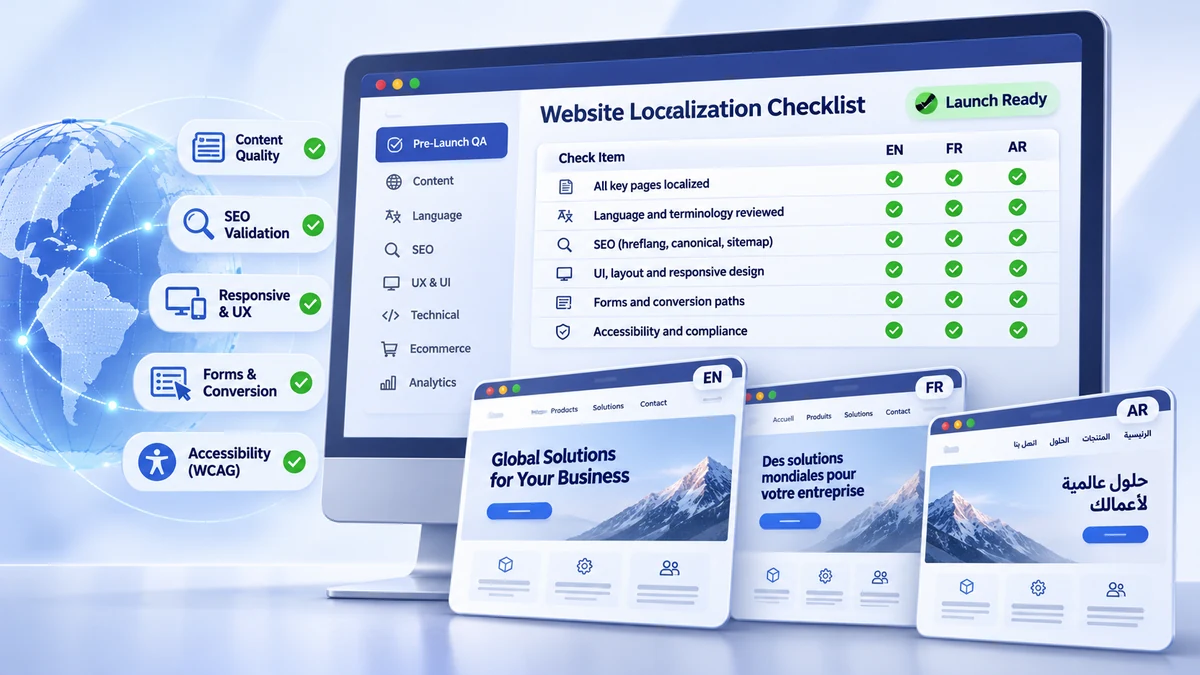
Launching a multilingual website involves more than publishing translated pages. Even when translations are accurate, a localized website can fail because of broken forms, incorrect language links, untranslated interface elements, unsuitable regional content, or technical SEO errors.
These problems are especially costly for business websites. A German product page may look correct but send inquiries to the wrong sales team. A French contact form may reject valid phone numbers. An Arabic landing page may contain accurate text but display navigation and form controls incorrectly.
The solution is a structured website localization checklist that evaluates each target locale before publication.
This guide provides 50 practical checks covering content, linguistic quality, UX, forms, multilingual SEO, technical functionality, accessibility, analytics, and release readiness. Each check includes an acceptance condition, responsible owner, priority, and evidence requirement.
The goal is straightforward: determine whether each localized website is ready for real users, search engines, and business transactions.
Quick Answer: What Should You Check Before Launching a Localized Website?
Before launching a multilingual website, verify:
- Market readiness: Target languages, regions, and local requirements are confirmed.
- Content completeness: Required pages, navigation, forms, and resources are localized.
- Linguistic quality: Translations are accurate, consistent, and appropriate for the audience.
- UI and UX: Layouts, responsive behavior, language switching, and local formats work.
- Conversion paths: Forms, notifications, checkout, and other business actions function correctly.
- Multilingual SEO: URLs, metadata, hreflang where used, canonicalization, crawlability, and indexing settings are validated.
- Technical quality: Links, scripts, assets, CMS components, and dynamic content work.
- Accessibility and analytics: Users can access essential functionality, and important events are measured.
- Release approval: Critical defects are resolved and responsible stakeholders approve publication.
A localized website is ready to launch only when its language, content, technical behavior, search configuration, and essential user journeys have been validated for each target locale.
How to Use This Website Localization Checklist
This checklist is intended for website managers, localization teams, developers, SEO specialists, QA engineers, and regional business owners.
Rather than reviewing the website informally, create a test record for each locale and assign ownership for every applicable check.
Record Six Elements for Every Check
| Field | What to Record |
|---|---|
| Checklist item | The specific condition being tested |
| Responsible owner | The person accountable for verification |
| Status | Not Tested, In Progress, Pass, Fail, or Approved N/A |
| Evidence | Screenshot, URL, test submission, crawl report, or approval record |
| Severity | Critical, Major, or Minor when a defect is found |
| Approval | Reviewer, decision, date, and any accepted exception |
A check should pass only when its acceptance condition has been demonstrated.
For example, verifying a localized contact form requires more than checking translated labels. The tester must submit data, confirm the response, and verify that the inquiry reaches the intended destination.
Use representative page templates for routine visual testing, but test every critical user journey and high-risk component. Record not-applicable items explicitly rather than counting them as automatic passes.
1. Market and Locale Readiness Checklist
Every multilingual launch should begin with an approved list of supported markets and locales.
Language and country are not interchangeable. French for France (fr-FR) and French for Canada (fr-CA) may require different terminology, pricing, contact information, and legal content.
Confirm that each locale has the correct language configuration, market scope, business information, and applicable regulatory review.
Also distinguish between internal locale identifiers, HTML language tags, and codes supported by Google for hreflang. They may follow different implementation rules.
Pass condition: Every release locale has an approved configuration and its market-specific content has been reviewed by the appropriate owner.
2. Content Completeness Checklist
A website translation checklist must cover more than visible page paragraphs.
Content can exist in CMS templates, reusable blocks, navigation menus, custom fields, email templates, downloadable files, product databases, and JavaScript-powered components.
Compare the approved source-page inventory against localized URLs and content records.
Pay particular attention to header and footer links, calls to action, product specifications, legal pages, validation messages, and transactional notifications.
Some content may intentionally remain in its original language, such as trademarks or approved technical identifiers. These exceptions should be documented.
Pass condition: Every required content item is present in the correct locale, with no unexplained omissions or untranslated interface strings.
3. Linguistic Quality Checklist
Accurate translation is necessary, but linguistic quality must also be evaluated in context.
Review meaning, terminology, grammar, spelling, regional conventions, tone, and brand voice. Technical websites also need consistent product names, specifications, and industry terminology.
For example, the word “lead” can refer to a sales prospect, an electrical connection, or a metal. The correct translation depends on context.
Qualified reviewers should inspect localized pages in their rendered website environment rather than relying only on translation files.
Pass condition: No material meaning errors remain, approved terminology is consistent, and priority content has received in-context language approval.
4. UI and UX Localization Checklist
Different languages place different demands on the same interface.
Translated navigation labels may become longer, buttons may wrap unexpectedly, and text can overlap nearby elements. These defects may appear only at particular screen widths.
Test priority templates on approved desktop, tablet, and mobile viewports.
For right-to-left languages, validate text direction and mixed-script behavior—not merely visual alignment. The W3C guidance on RTL markup recommends using semantic direction attributes such as dir="rtl" where appropriate.
Also verify dates, number formatting, measurement units, address presentation, and language selection. Unicode CLDR provides reference data for many locale conventions.
Pass condition: Users can read, navigate, and interact with the localized interface without language-related layout or formatting defects.
5. Forms and Conversion Paths Checklist
Forms are among the highest-risk components of multilingual websites because failures can directly affect leads and transactions.
Test contact forms, inquiry forms, registrations, downloads, and checkout journeys where applicable.
Check localized labels, required fields, error messages, success states, country selectors, phone-number validation, attachments, and privacy text.
Then verify the complete submission path.
For a B2B inquiry form, this means confirming that a valid test submission reaches the configured mailbox or CRM, contains the expected information, and triggers the correct notification.
Do not assume that a success message proves successful delivery.
Pass condition: Every essential conversion journey works end-to-end using representative locale-specific test data.
6. Multilingual SEO Checklist
International SEO requires separate technical verification because translated content can be correct while search-related configuration is not.
Check Localized URLs, Titles, and Search Intent
Google recommends using separate URLs for different language versions instead of relying entirely on cookies or browser language preferences.
Review localized page titles, meta descriptions, headings, and internal links.
Keyword localization should reflect real target-language terminology and search intent, not automatic word-for-word translation.
Validate Hreflang and Canonical Relationships
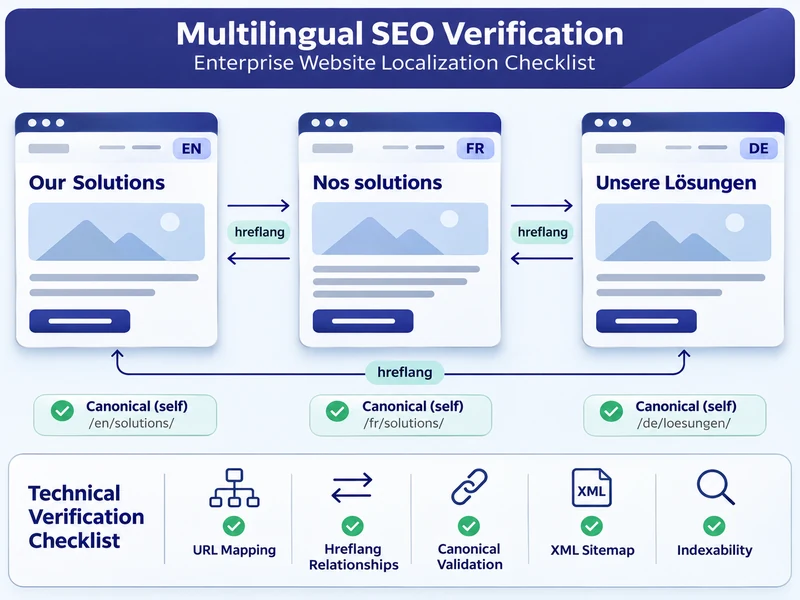
If the website uses hreflang, check supported codes, equivalent pages, reciprocal links, self-references, and fully qualified URLs.
Google supports hreflang annotations through HTML, HTTP headers, or XML sitemaps. Implementing all three is not required.
Importantly, hreflang is recommended for communicating localized alternatives but is not mandatory for multilingual pages to be indexed.
Canonical URLs must also follow the intended indexing strategy. Fully translated pages generally should not canonicalize to the English original. Closely duplicated same-language regional pages may require more nuanced handling.
Verify Indexability and Crawlability
Check robots.txt, meta robots directives, HTTP headers, status codes, and canonical signals.
An unintended noindex directive can prevent an entire localized section from appearing in search results.
Verify XML sitemaps and internal navigation. Where structured data is implemented, ensure that it accurately represents the visible content and meets the relevant Google guidelines.
According to Google Search Central’s international SEO documentation, the purpose of these annotations is to help Google understand relationships between localized versions, not to guarantee rankings or indexing.
Pass condition: Intended public pages are accessible to crawlers, have consistent search signals, and use the approved international targeting configuration.
7. Technical and Functional QA Checklist
Localized websites can contain defects that ordinary language review cannot detect.
Inspect broken links, unavailable downloads, missing images, incorrect redirects, encoding failures, and JavaScript errors.
Test localized search, filters, reusable CMS components, dynamic content, third-party widgets, and language fallback rules.
For CMS-based websites, verify that translated custom fields and interface strings appear correctly on the rendered pages.
Check supported browsers and mobile devices, and investigate unexpected performance regressions.
Pass condition: All essential localized features work, and no release-critical technical errors remain.
8. Ecommerce and Product Experience Checklist
Ecommerce launches require additional market-specific verification.
Check displayed currencies, final charges, taxes, product variations, stock availability, delivery information, and measurement units.
Test the complete checkout, including address collection, shipping calculations, payment instructions, confirmation pages, and transactional emails.
An incorrect final charge or broken payment flow should be treated as a release-blocking defect.
For corporate or lead-generation websites without ecommerce functionality, mark these checks as approved N/A.
9. Media and Accessibility Checklist
Localized accessibility testing should cover both translated media and website interactions.
Review embedded text inside images, descriptive alt text, subtitles, captions, transcripts where applicable, and other accessible alternatives.
Check keyboard navigation, focus visibility, form labels, contrast, and screen-reader behavior.
Confirm that HTML language declarations are correct and that right-to-left layouts preserve logical reading order.
Use the applicable requirements of WCAG 2.2 as the technical reference, with project-specific acceptance criteria defined before testing.
Pass condition: Essential information and interactions remain accessible in each supported locale.
10. Analytics and Conversion Tracking Checklist
Measurement must be verified before the localized site goes live.
Confirm that GA4 or the approved analytics platform records page activity, supports the required locale-level reporting, and captures important business events.
Test form submissions, CTA clicks, registrations, and purchases where applicable.
For lead-generation websites using GA4, Google’s recommended generate_lead event may be appropriate, although event implementation depends on the organization’s measurement plan.
Check for duplicate events, incorrect destinations, missing attribution, and consent-related behavior.
Also confirm Google Search Console access for the relevant website properties.
Pass condition: The team can reliably monitor localized traffic, conversions, and technical search performance after publication.
11. Pre-Launch Testing and Final Approval
The final testing stage should take place on a staging environment that closely represents production.
Complete functional testing, linguistic review, technical SEO validation, accessibility checks, and critical user-journey testing.
Review the defect register and obtain sign-off from the necessary stakeholders.
Confirm the production configuration, deployment responsibilities, backup or recovery arrangements, rollback procedure, and post-launch smoke-test plan.
Pass condition: All applicable release-critical checks pass, required approvals are recorded, and the release owner authorizes deployment.
12. The 50-Point Website Localization Master Checklist
Use the following master checklist as the shared acceptance record for each target locale.
Priority guide: P0 = release-critical; P1 = high priority; P2 = conditional or lower priority. Priorities should be adjusted to reflect the project’s actual business and compliance risks.
Status: In the Pass/Fail column, use the first checkbox for Pass and the second for Fail. Maintain Not Tested and Approved N/A in the working QA record.
Owner abbreviations: LOC = Localization; MKT = Market Owner; LING = Linguist; CONTENT = Content; DEV = Development; QA = Quality Assurance; UX = Design/UX; SEO = SEO; EC = Ecommerce; A11Y = Accessibility; DATA = Analytics; LEGAL = Compliance; REL = Release Manager.
A. Market, Content, and Language Checks
| Phase | Check and Acceptance Condition | Owner | Priority | Pass/Fail | Evidence | Action |
|---|---|---|---|---|---|---|
| Market | 01. All target languages and regions match the approved locale matrix. | LOC | P0 | ☐ / ☐ | Locale matrix | Correct configuration |
| Market | 02. Required regional disclosures and regulated claims are approved. | LEGAL | P0 | ☐ / ☐ | Legal approval | Obtain review |
| Market | 03. Local offers, contacts, and service availability are accurate. | MKT | P1 | ☐ / ☐ | Market review | Correct information |
| Content | 04. All required localized pages and templates are complete. | CONTENT | P0 | ☐ / ☐ | URL inventory | Complete pages |
| Content | 05. Navigation, header, footer, and breadcrumbs use approved localized content. | CONTENT | P1 | ☐ / ☐ | Screenshots | Correct strings |
| Content | 06. CTAs, popups, banners, and destinations match the locale. | CONTENT | P1 | ☐ / ☐ | UI review | Update components |
| Content | 07. Product and service descriptions match approved specifications. | MKT | P0 | ☐ / ☐ | Content comparison | Correct inaccuracies |
| Content | 08. Required downloads, resources, policies, and legal pages are available. | CONTENT | P1 | ☐ / ☐ | Asset inventory | Complete resources |
| Content | 09. Error pages, alerts, system messages, and emails are localized. | LOC | P1 | ☐ / ☐ | String audit | Localize omissions |
| Language | 10. No material mistranslations or critical omissions remain. | LING | P0 | ☐ / ☐ | Linguistic QA | Correct translation |
| Language | 11. Approved technical and brand terminology is consistent. | LING | P1 | ☐ / ☐ | Terminology report | Standardize terms |
| Language | 12. Grammar, spelling, tone, and locale conventions are approved. | LING | P1 | ☐ / ☐ | Language review | Revise content |
| Language | 13. Priority pages have passed in-context linguistic review. | LOC | P1 | ☐ / ☐ | Reviewer sign-off | Complete review |
B. UI, UX, and Form Checks
| Phase | Check and Acceptance Condition | Owner | Priority | Pass/Fail | Evidence | Action |
|---|---|---|---|---|---|---|
| UX | 14. Translation expansion causes no critical clipping, overlap, or truncation. | UX | P1 | ☐ / ☐ | Screen captures | Adjust layout |
| UX | 15. Critical templates work across approved screen sizes. | QA | P1 | ☐ / ☐ | Device results | Fix responsiveness |
| UX | 16. RTL pages display correct directionality and mixed-script text. | DEV | P0* | ☐ / ☐ | RTL tests | Fix direction |
| UX | 17. Dates, numbers, currencies, and units follow approved locale rules. | LOC | P1 | ☐ / ☐ | Format samples | Correct formatting |
| UX | 18. Language switching reaches valid equivalent or appropriate fallback pages. | QA | P0 | ☐ / ☐ | Navigation tests | Repair links |
| Forms | 19. Required forms accept valid locale-specific inputs. | QA | P0 | ☐ / ☐ | Submission test | Fix validation |
| Forms | 20. Validation, error, success, and thank-you states work correctly. | QA | P0 | ☐ / ☐ | State screenshots | Correct feedback |
| Forms | 21. Test submissions reach the intended inbox or CRM and trigger notifications. | DEV | P0 | ☐ / ☐ | Delivery record | Repair routing |
| Forms | 22. Applicable uploads, consent controls, and failure states work. | QA | P1 | ☐ / ☐ | Test log | Correct functionality |
C. Multilingual SEO Checks
| Phase | Check and Acceptance Condition | Owner | Priority | Pass/Fail | Evidence | Action |
|---|---|---|---|---|---|---|
| SEO | 23. Intended localized pages have stable, accessible URLs. | SEO | P0 | ☐ / ☐ | URL crawl | Repair routing |
| SEO | 24. Priority pages contain approved localized titles and meta descriptions. | SEO | P1 | ☐ / ☐ | Metadata audit | Update metadata |
| SEO | 25. Headings and target terms reflect local search intent. | SEO | P1 | ☐ / ☐ | Keyword map | Revise targeting |
| SEO | 26. Implemented hreflang mappings use valid codes and reciprocal relationships. | SEO | P0* | ☐ / ☐ | Hreflang audit | Correct annotations |
| SEO | 27. Canonical signals match the approved indexing strategy. | SEO | P0 | ☐ / ☐ | Canonical audit | Correct signals |
| SEO | 28. Intended indexable pages have no unintended crawl or indexing restrictions. | SEO | P0 | ☐ / ☐ | Crawl report | Remove restrictions |
| SEO | 29. XML sitemaps contain intended canonical URLs and valid alternates if configured. | SEO | P1 | ☐ / ☐ | Sitemap audit | Regenerate sitemap |
| SEO | 30. Internal links lead to appropriate localized and canonical destinations. | SEO | P1 | ☐ / ☐ | Link crawl | Correct links |
| SEO | 31. Redirects work without blocking access to available locales. | DEV | P0 | ☐ / ☐ | Redirect test | Repair redirects |
| SEO | 32. Visible content and HTML language declarations match the intended locale. | DEV | P1 | ☐ / ☐ | HTML review | Correct configuration |
| SEO | 33. Applicable structured data is valid and matches visible content. | SEO | P2 | ☐ / ☐ | Validation results | Correct markup |
D. Technical and Functional Checks
| Phase | Check and Acceptance Condition | Owner | Priority | Pass/Fail | Evidence | Action |
|---|---|---|---|---|---|---|
| Technical | 34. Essential links, assets, and downloads are accessible. | QA | P0 | ☐ / ☐ | Crawl report | Repair resources |
| Technical | 35. Local characters and scripts display without encoding or font errors. | DEV | P0 | ☐ / ☐ | Rendering tests | Fix encoding |
| Technical | 36. CMS fields, scripts, dynamic content, and locale fallbacks work. | DEV | P0 | ☐ / ☐ | Integration tests | Fix implementation |
| Technical | 37. Search, filters, and important interactions work in supported browsers. | QA | P1 | ☐ / ☐ | Functional tests | Correct behavior |
| Technical | 38. Critical pages meet approved performance and error thresholds. | DEV | P1 | ☐ / ☐ | Performance report | Resolve regressions |
E. Ecommerce, Media, and Accessibility Checks
| Phase | Check and Acceptance Condition | Owner | Priority | Pass/Fail | Evidence | Action |
|---|---|---|---|---|---|---|
| Ecommerce | 39. Prices, currencies, taxes, and final charges are accurate. | EC | P0* | ☐ / ☐ | Pricing test | Correct calculations |
| Ecommerce | 40. Product variants, units, stock, and delivery details are accurate. | EC | P1 | ☐ / ☐ | Product review | Update records |
| Ecommerce | 41. Checkout, payments, and transactional notifications work. | EC | P0* | ☐ / ☐ | Test order | Repair checkout |
| Media | 42. Meaningful image text and downloadable visual assets are localized. | CONTENT | P1 | ☐ / ☐ | Asset review | Replace assets |
| Accessibility | 43. Essential controls meet applicable accessibility acceptance criteria. | A11Y | P0* | ☐ / ☐ | Accessibility audit | Remove barriers |
| Accessibility | 44. Relevant images and multimedia have appropriate accessible alternatives. | A11Y | P1 | ☐ / ☐ | Media audit | Add alternatives |
F. Analytics and Release Checks
| Phase | Check and Acceptance Condition | Owner | Priority | Pass/Fail | Evidence | Action |
|---|---|---|---|---|---|---|
| Analytics | 45. Analytics records page activity with required locale reporting. | DATA | P0 | ☐ / ☐ | Analytics debug | Fix measurement |
| Analytics | 46. Important conversion events fire correctly without unwanted duplicates. | DATA | P0 | ☐ / ☐ | Event log | Repair tracking |
| Analytics | 47. Search Console access and applicable consent configurations are verified. | DATA | P1 | ☐ / ☐ | Setup review | Correct setup |
| Release | 48. All required stakeholders have completed staging sign-off. | LOC | P0 | ☐ / ☐ | Approval record | Obtain approval |
| Release | 49. Critical defects are closed and other issues have approved dispositions. | QA | P0 | ☐ / ☐ | Defect register | Resolve or escalate |
| Release | 50. Deployment, recovery, rollback, and live testing arrangements are approved. | REL | P0 | ☐ / ☐ | Release plan | Complete readiness |
Conditional P0 checks apply when the corresponding feature, market requirement, or release-critical acceptance condition is in scope. For example, hreflang is not universally mandatory, and ecommerce checks do not apply to a website without ecommerce functionality.
How to Record Failed Checks
A failed check should create a traceable defect record containing the affected locale, URL, test condition, expected result, actual result, severity, evidence, assigned owner, and retest outcome.
For example:
- Defect: FR-FORM-014
- Locale: fr-FR
- Issue: Contact form displays a success message but does not create a CRM record.
- Severity: Critical
- Owner: Developer
- Acceptance: A valid French test inquiry creates the expected CRM entry and notification.
A defect is closed only after the correction has been verified.
13. Launch-Blocking Issues vs. Minor Localization Defects
Not every localization problem should prevent publication. However, teams need consistent severity definitions.
| Severity | Definition | Example | Release Decision |
|---|---|---|---|
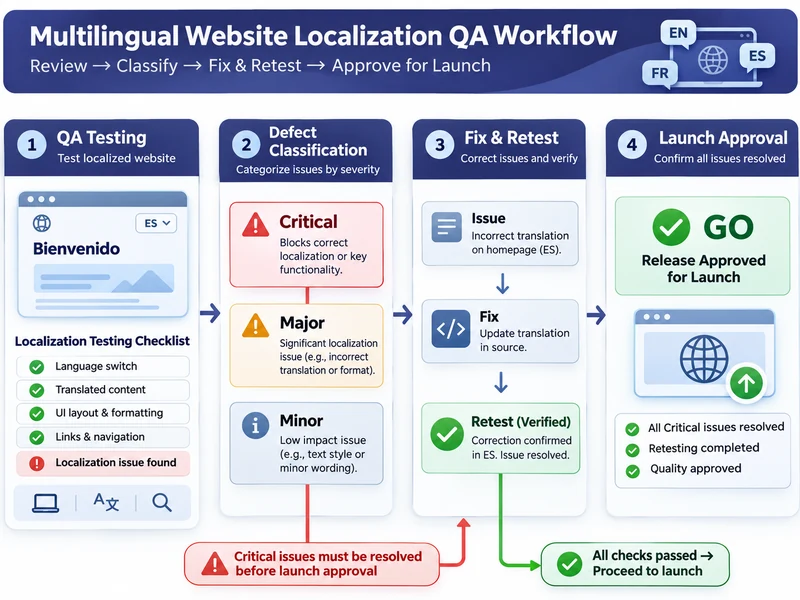
| Critical | Essential functionality, material accuracy, compliance, or a release-critical requirement fails. | Lead form cannot submit; incorrect checkout charge; entire intended locale is unintentionally noindex. |
Block affected release |
| Major | Important functionality or user experience is significantly impaired. | Incorrect locale links on important pages; serious mobile layout problems. | Resolve or obtain authorized exception |
| Minor | Limited impact on understanding or essential functionality. | Minor spacing, punctuation, or cosmetic inconsistency. | May launch with documented remediation |
Go/No-Go Release Criteria
GO: All applicable P0 checks pass, no Critical defects remain, required approvals are complete, and recovery procedures are ready.
CONDITIONAL GO: Only noncritical issues remain, with documented business acceptance, mitigation, owners, and correction deadlines.
NO-GO: Critical defects remain, required approvals are missing, essential journeys have failed, or safe deployment and recovery cannot be assured.
A minor translation issue may be acceptable temporarily. A form that silently loses customer inquiries should not be.
For more detailed quality evaluation principles, see Localization Quality Metrics: Beyond Error Counts.
14. Who Should Approve a Localized Website Launch?
Localization quality assurance requires coordination across functions. One team should not approve areas it has not competently tested.
| Role | Primary Approval Responsibility |
|---|---|
| Localization Manager | Locale coverage and linguistic review completion |
| Native-language Reviewer | Accuracy, terminology, and language suitability |
| Regional Business Owner | Commercial content and market relevance |
| Content Manager | Page completeness and content consistency |
| Developer | CMS integration, functionality, and deployment |
| SEO Specialist | International search configuration |
| QA Engineer | Test execution and defect verification |
| UX / Accessibility Reviewer | Interface usability and accessibility |
| Ecommerce Owner | Product, pricing, and checkout behavior |
| Analytics Owner | Measurement and conversion tracking |
| Legal / Compliance Reviewer | Applicable regulatory and legal content |
| Release Manager | Final authorized Go/No-Go decision |
The release manager should maintain a single approval record, including unresolved exceptions and their responsible owners.
15. Post-Launch Localization Monitoring Checklist
Passing staging tests does not guarantee that production will behave identically.
Publishing can introduce unexpected redirects, configuration changes, broken integrations, or indexing restrictions.
Use the following monitoring schedule after deployment.
| Timing | Check | Acceptance Evidence |
|---|---|---|
| Launch day | Verify priority localized URLs | Production pages load correctly |
| Launch day | Submit essential forms and test transactions | Successful end-to-end results |
| Launch day | Check language switching and redirects | Correct destinations |
| Launch day | Verify canonical, hreflang, and robots settings | Approved production signals |
| Launch day | Test analytics and conversion events | Events received correctly |
| First 1–3 days | Review errors, assets, and performance | No unexpected critical failures |
| First 1–3 days | Verify sitemap access and Search Console setup | Properties and sitemaps accessible |
| First 7–14 days | Review crawling and indexing signals | Unexpected exclusions investigated |
| First 7–14 days | Compare traffic and conversions by locale | Reporting anomalies investigated |
| First 7–14 days | Review customer feedback | Localization defects assigned |
| First 30 days | Evaluate localized user journeys | Improvement backlog created |
| Ongoing | Monitor source-content updates | Localized versions remain synchronized |
Remember that indexing is not instantaneous or guaranteed. Search Console helps teams investigate indexing outcomes, but a newly published URL that has not yet appeared in search results is not automatically defective.
Localized content also requires ongoing maintenance. Product updates, revised policies, new features, and changed source-language content may create new translation and testing requirements.
16. Common Website Localization Checklist Mistakes
Reviewing Only Translated Text
A linguistically accurate page can still contain broken buttons, incorrect links, and nonfunctional forms.
Better approach: Combine linguistic review with technical and user-journey testing.
Missing Form Validation Messages
Teams often translate field labels but overlook errors, confirmations, and notification emails.
Better approach: Test valid and invalid inputs and inspect the final receiving systems.
Incorrect Language Links
A language selector may return visitors to the homepage instead of the corresponding page—or send them to an unsupported locale.
Better approach: Test page-to-page locale relationships, fallback behavior, and actual destinations.
Ignoring Multilingual SEO
Unintended noindex rules, conflicting canonical signals, and incorrect alternate-language mappings can undermine international search visibility.
Better approach: Validate the technical configuration independently of content QA.
Skipping Mobile and RTL Testing
Translations may render correctly on desktop but fail on smaller screens or right-to-left interfaces.
Better approach: Test representative layouts and real language-specific content.
No Post-Launch Monitoring
Teams may complete staging QA but fail to detect production issues or later content changes.
Better approach: Assign monitoring owners and establish recurring regression checks.
FAQ
What is a website localization checklist?
A website localization checklist is a structured set of quality assurance checks used to verify that a localized website is accurate, functional, accessible, search-ready, and suitable for its intended audience. It supports evidence-based testing and release decisions.
How do you test a localized website?
Test localized pages using linguistic review, responsive UI testing, form submissions, functional checks, international SEO audits, accessibility testing, and analytics verification. Record the expected result, actual result, evidence, and defect severity for each check.
What should be checked before a multilingual launch?
Check locale settings, content coverage, translation quality, navigation, local formats, forms, conversion paths, SEO configuration, technical functionality, accessibility, analytics, and stakeholder approvals. Release-critical failures should be corrected before publication.
Is hreflang required for multilingual websites?
No. Google can recognize different language versions without hreflang. However, Google recommends explicitly indicating localized alternatives to help serve suitable versions in search results. When implemented, hreflang annotations should use supported codes and correct reciprocal relationships.
How do I verify translated website forms?
Submit valid and invalid entries for each relevant locale. Verify labels, required fields, phone and country handling, error messages, confirmation states, notifications, and receiving systems. A displayed success message alone is not sufficient evidence.
Who should approve localized website content?
Qualified linguists should approve language quality, regional stakeholders should approve market suitability, and specialist teams should approve technical functionality, SEO, accessibility, and relevant legal requirements. A designated release manager should authorize the final deployment.
Final Website Localization Launch Readiness Review
A successful multilingual launch depends on more than translation completion.
Every target locale must provide accurate information, functional navigation, usable interfaces, accessible content, appropriate search signals, and reliable paths to business outcomes.
The most effective website localization checklist is one that teams can actually execute: every check has an owner, a clear acceptance condition, supporting evidence, and a defined response when something fails.
Use the 50-point checklist before publication, apply risk-based release criteria, and repeat critical verification after deployment.
For organizations still preparing their multilingual implementation, the Website Localization Process: From Audit to Launch explains the broader workflow that precedes this final QA review.
A localized website is not launch-ready simply because it has been translated. It is launch-ready when each intended locale has been tested, its critical user journeys work, and the responsible teams have approved the release.