Choosing the best AI translation tools for business involves more than comparing translation speed, language coverage, or how natural a few sample sentences sound.
A tool that works well for translating internal emails may not be suitable for multilingual software releases. A powerful translation API may lack the approval workflows required by a global marketing team. And a platform advertised as enterprise-ready may still require careful review of its data retention policies, terminology controls, and integration costs.
Businesses therefore need to compare different types of translation technology against their actual operational requirements.
This guide examines seven relevant AI translation solutions, explains how their capabilities differ, and provides a practical framework for evaluating translation quality, document support, security, integrations, and total cost of ownership.
Product capabilities, publicly listed pricing, and security documentation last verified: November 21, 2026. Features and terms may vary by product, plan, region, and contract.
Quick Answer: What Is the Best AI Translation Tool for Business?
The best AI translation tool depends on what your organization needs to translate and how that content will be managed.
DeepL is worth evaluating for business document translation. Google Cloud Translation, Microsoft Azure Translator, and Amazon Translate provide cloud-based translation APIs for automated workflows. OpenAI’s API supports configurable LLM-based translation solutions, while Phrase and Smartling offer broader localization management capabilities.
For business procurement, the most important criteria are translation quality, language-pair suitability, terminology consistency, document handling, data security, integration capabilities, human review, and total operating cost.
No single platform can be considered the most accurate or suitable for every language, content type, and organization without representative testing.
What Counts as an AI Translation Tool?
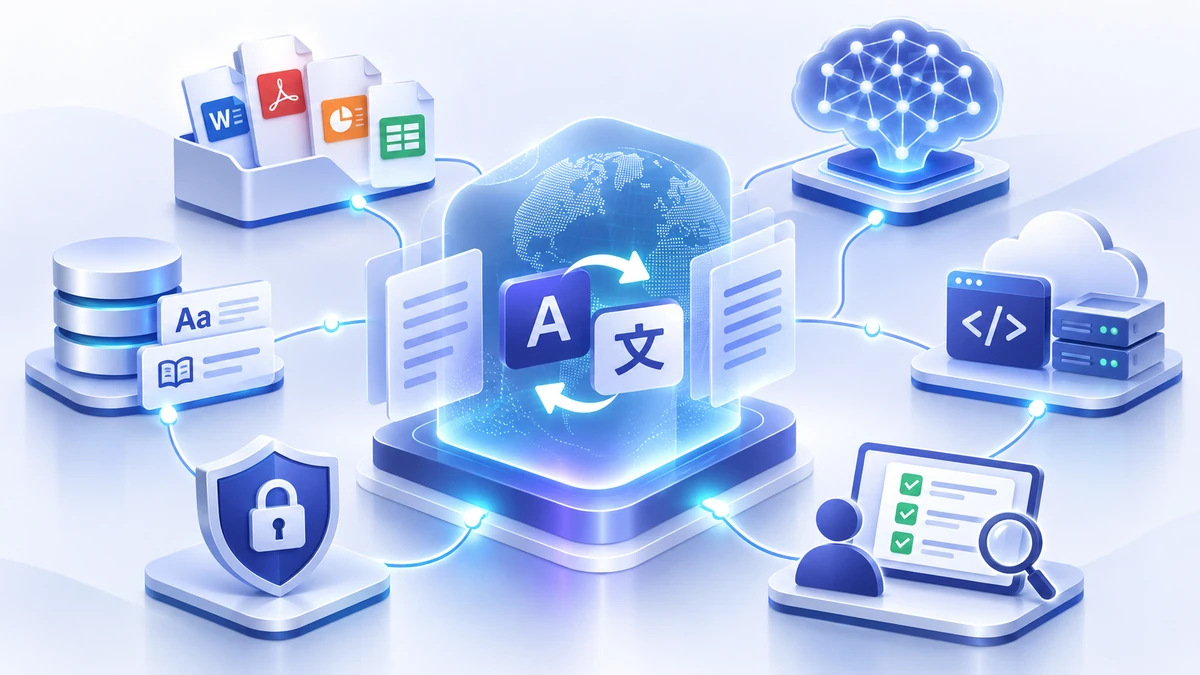
The term AI translation tool covers several technologies that perform different functions. Understanding these categories prevents businesses from comparing products that were designed to solve different problems.
Standalone AI Translators
Standalone translators provide interfaces where users enter text or upload documents and receive translated content.
They are convenient for internal communications, business presentations, and occasional document translation. Business plans may add team administration, glossaries, and stronger privacy commitments.
However, a document translator does not necessarily provide translation project management, reviewer assignments, or multilingual publishing workflows.
Enterprise Machine Translation Platforms
Enterprise machine translation platforms use translation engines, commonly based on neural machine translation (NMT), to process text through APIs or document translation services.
They are designed for applications such as translating product catalogs, internal knowledge bases, and large volumes of operational content.
Google Cloud Translation, Azure Translator, and Amazon Translate are examples of this category.
LLM-Based Translation Solutions
Large language models can translate text using detailed instructions, terminology references, document context, and style guidance.
An organization might build an OpenAI API workflow that translates product descriptions into several languages while preserving structured data.
However, the translation model itself does not automatically supply a complete localization system. File parsing, terminology validation, error handling, approvals, and publishing integrations may need to be developed separately.
For more detail on this approach, see Generative AI Translation: Benefits, Risks & Best Uses.
AI-Assisted CAT and TMS Platforms
Computer-assisted translation (CAT) tools help linguists work with translation memories, terminology databases, and segmented content.
Translation management systems (TMS) coordinate projects, users, translation engines, review stages, and delivery.
Platforms such as Phrase and Smartling combine AI translation capabilities with broader localization workflows.
The essential distinction is between generating a translation and managing the entire translation lifecycle. A company may need one capability, the other, or both.
For a deeper distinction between the underlying technologies, see AI Translation vs Machine Translation: NMT vs LLM Explained.
AI Translation Tool Categories Compared
| Tool Category | Typical Business Use | Main Strengths | Main Limitations | Best-Fit Buyer |
|---|---|---|---|---|
| Consumer translator | Occasional short text | Accessible and easy to operate | Limited enterprise governance | Individual users |
| Business document translator | Office files and internal content | File handling and team features | Limited localization orchestration | SMEs and business teams |
| Enterprise MT platform | High-volume automated translation | APIs, scalability, customization | Requires integration | IT and product teams |
| LLM translation workflow | Context-rich multilingual content | Flexible instructions and output control | Engineering and QA overhead | Technical teams |
| AI-assisted CAT/TMS | Continuous localization | Translation memory, reviews, approvals | Setup and management costs | Localization departments |
| Document translation solution | Structured and formatted files | Document-aware processing | Format-specific restrictions | Document-intensive businesses |
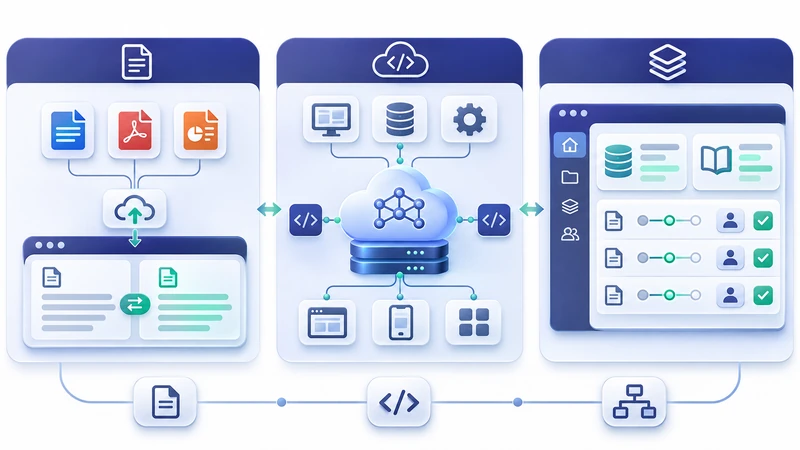
These categories overlap. A business translation platform may include an API, while a TMS may connect to multiple independent machine translation engines.
For example, a company might use a cloud MT engine to generate translations, a TMS to assign human reviews, and a CMS integration to publish approved content.
That architecture should be evaluated as a complete workflow rather than as three unrelated software purchases.
11 Criteria for Evaluating Business AI Translation Software
Before creating a vendor shortlist, define your organization’s requirements.
| Evaluation Criterion | What Businesses Should Check |
|---|---|
| Language coverage | Required language pairs and regional variants |
| Domain suitability | Performance with industry-specific content |
| Translation quality | Meaning, completeness, consistency, and fluency |
| Terminology | Glossaries, approved terms, and enforcement |
| Document handling | Supported formats and layout preservation |
| Security | Data use, retention, access, and processing location |
| API capabilities | Integration, batch requests, and automation |
| Integration | Compatibility with CMS, TMS, and internal systems |
| Scalability | Throughput, limits, availability, and reliability |
| Human review | Post-editing, quality checks, and approvals |
| Pricing | Licensing, usage, implementation, and operating costs |
These criteria should not receive equal priority in every organization.
A software company may place more weight on API connectivity and structured-file integrity. A legal department may prioritize confidentiality, document handling, and qualified review. An ecommerce business may emphasize terminology consistency and cost-effective processing at scale.
Establish mandatory requirements before comparing optional capabilities.
Language Coverage: Why Language Pairs and Locales Matter
A vendor’s advertised language count is useful for initial screening, but it does not establish whether the product meets a specific localization requirement.
Businesses should verify the exact source-to-target direction, because language support and translation behavior can differ between directions, models, and features.
Regional variants also matter. Brazilian Portuguese and European Portuguese have different conventions, as do Canadian French and European French.
A platform may support a language without providing reliable control over the required locale, industry terminology, or stylistic conventions.
Lower-resource languages deserve particular attention. Translation quality may vary because of differences in available training data, linguistic structures, and domain coverage.
For procurement, create a language-pair matrix that identifies the source language, target locale, content domain, translation volume, and required quality level.
Test these combinations independently rather than relying on a general language-coverage claim.
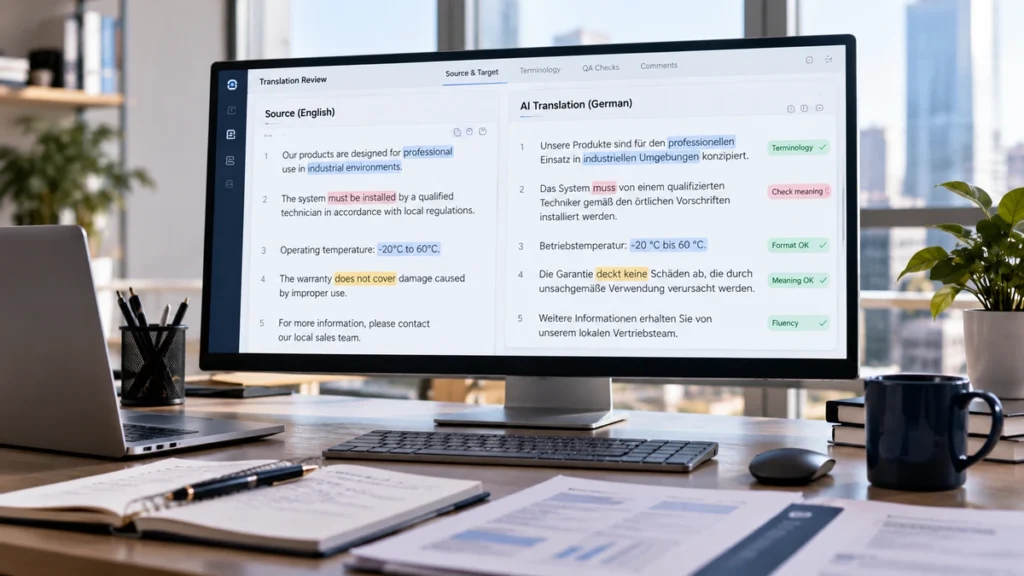
How Should Businesses Evaluate AI Translation Quality?
Fluent translation is not necessarily accurate translation.
An AI system can produce polished sentences while changing technical instructions, omitting conditions, or introducing unsupported information.
A practical translation quality assessment should examine several dimensions.
Meaning and completeness: Does the translation preserve the original message, including numbers, negations, conditions, and warnings?
Terminology: Does it use approved product names, technical expressions, and industry-specific language?
Fluency and context: Is the output grammatically appropriate and suitable for the intended audience and content type?
Consistency: Are recurring terms and instructions translated consistently across documents and updates?
Unsupported additions: Has the system introduced claims, specifications, or explanations that do not appear in the source?
For example, mistranslating “must not exceed 50°C” into a statement permitting temperatures above that limit is a critical error, even if the target sentence reads naturally.
The Multidimensional Quality Metrics (MQM) framework provides established error categories including accuracy, terminology, linguistic conventions, style, locale conventions, and design or markup.
Organizations should define acceptable error thresholds based on content risk, rather than accepting a vendor’s general accuracy percentage.
See AI Translation Accuracy: How to Test Business Content for a more detailed evaluation methodology.
AI Document Translation: Which File Formats Matter?
Business translation often involves more than plain text.
Contracts, operating procedures, presentations, spreadsheets, product specifications, and website files may contain complex formatting or structured content.
Office Documents and PDFs
DOCX, PDF, PPTX, and XLSX are common requirements, but support varies by provider and processing method.
Official documentation confirms that DeepL supports these formats on eligible plans, while Google Cloud Translation and Azure Translator provide document translation capabilities covering these formats. Amazon Translate supports DOCX, PPTX, and XLSX in batch workflows but does not list PDF as a supported native batch input format.
File-format support does not guarantee complete formatting preservation.
For example, Google Cloud documents limitations involving text boxes and potential formatting losses when processing scanned or complex PDFs.
A successful pilot should inspect tables, headers, hyperlinks, presentation layouts, spreadsheet formulas, and text embedded within images.
HTML and Structured Localization Files
Website and software localization introduce additional requirements.
HTML translation must preserve markup and protected attributes. JSON and XML workflows must distinguish translatable strings from identifiers, variables, and application configuration.
Localization formats such as XLIFF may be better suited to CAT/TMS workflows, particularly where translators need segment-level context and translation-memory matching.
For every shortlisted product, verify the supported format, processing endpoint, maximum file size, and expected output structure.
Terminology Management and Translation Memory
Terminology consistency becomes increasingly important as an organization translates more content.
A glossary defines approved equivalents for product names, technical terms, and frequently used expressions.
Google Cloud Translation supports glossaries through its Advanced API, while Amazon Translate provides custom terminology capabilities. DeepL also offers glossary functionality.
However, glossary support is not identical across products. Some systems apply terminology through defined matching rules, while LLM-based workflows may rely partly on instructions and subsequent validation.
Translation memory ™ serves a different purpose. It stores previously translated segments so approved content can be reused, compared, or reviewed during future projects.
A terminology database might specify how to translate a product feature. A translation memory can preserve an approved sentence describing that feature.
Businesses managing recurring localization work should evaluate glossary controls, TM compatibility, import/export options, and ownership of linguistic assets.
These assets can have significant long-term value because they reduce duplicated work and support consistency across vendors and technologies.
Security, Data Privacy, and Confidentiality
Security requirements should influence product selection before confidential business content is uploaded for testing.
Consumer and enterprise offerings may operate under different contractual terms. Buyers should review the specific product and subscription, not assume that a familiar brand provides identical protections across its services.
Data Training and Retention
Several providers document important differences in how customer content is handled.
Google states that content submitted to its Cloud Translation API is not used to improve its translation models. Microsoft documents that Azure Translator does not persist submitted translation content after processing.
OpenAI states that API data is not used to train its models by default. However, standard abuse-monitoring logs may retain content for up to 30 days, and certain API features maintain application state. Additional retention controls are available to eligible customers.
Amazon Translate’s official FAQ explains that submitted content may be used for service improvement and describes an AWS Organizations mechanism for opting out.
These differences demonstrate why “not used for training” and “not retained” should never be treated as equivalent promises.
Enterprise Security Requirements
Procurement teams should also examine access controls, SSO, encryption, data processing agreements, subprocessors, regional processing, deletion procedures, and auditability.
Where sensitive information is involved, ask vendors to identify exactly which services process customer content and whether subcontracted AI providers receive any of that data.
Security certifications can support vendor due diligence, but they do not replace a review of the applicable agreement and technical configuration.
API Access and Enterprise Integration
An AI translation API allows businesses to integrate translation into existing products and operational systems.
Common applications include ecommerce catalogs, content management systems, customer-support platforms, product databases, and multilingual software releases.
For example, an ecommerce company could automatically send newly approved product descriptions to a translation service, retrieve translated content, and route it through terminology and quality checks before publication.
A complete integration should address authentication, rate limits, batch processing, retries, monitoring, error handling, and version control.
Businesses should also consider what happens when source content changes. An effective workflow should identify outdated translations and prevent unapproved content from being published.
API availability alone does not establish integration readiness. The cost of building and maintaining reliable automation may exceed the underlying translation charges.
Human Review and Translation Quality Controls
Human review remains an important part of many enterprise translation workflows.
Machine translation post-editing allows qualified linguists to correct generated content. Linguistic quality assurance (LQA) provides a structured process for identifying and classifying translation errors.
For ongoing localization, organizations may also need reviewer assignments, approval stages, change histories, and audit trails.
Dedicated TMS platforms generally provide more native workflow-management capabilities than standalone translation APIs.
However, businesses should verify which review functions are available under their selected plan and whether external reviewers can participate without additional licensing.
Review requirements should reflect content risk. An internal knowledge-base article and a safety-critical operating instruction should not automatically receive identical treatment.
For workflow-level decisions, read Human Translation vs AI Translation: Choose the Right Workflow.
Seven AI Translation Tools Worth Evaluating
The following products represent different approaches to business translation. They are presented by product category rather than accuracy ranking.
Published prices are indicative figures from official sources, verified on November 21, 2026. Taxes, negotiated discounts, regional differences, and additional services may affect actual costs.
1. DeepL — Business Document Translation
DeepL offers business translation subscriptions, document translation, glossary functionality, and separate developer API plans.
It is a relevant option for organizations translating Office documents, presentations, and business communications without building a complete localization platform.
Its publicly listed Business plan starts at €49.99 per user per month when billed annually in the referenced EUR pricing configuration. API pricing is separate. DeepL’s API Developer plan includes a one-time allowance of one million characters, while higher-volume usage requires a paid plan.
Considerations: Check plan-specific file limits, required language pairs, and translation-memory functionality. Review DeepL’s business data-protection terms before processing confidential documents.
A separate DeepL-versus-Google comparison may help with the narrower question of consumer and business document translation; it should not be confused with this cross-category enterprise evaluation.
2. Google Cloud Translation — Scalable Translation APIs
Google Cloud Translation supports programmatic text and document translation, glossaries, customized models, and specialized translation-model options.
It is suited to businesses integrating translation into applications or high-volume content pipelines.
Published standard NMT pricing is $20 per million characters beyond the applicable monthly 500,000-character credit. Certain formatted-document operations are billed separately, with standard NMT rates starting at $0.08 per page.
Considerations: Implementation requires development resources. Buyers should assess formatting limitations, regional processing configuration, and the need for external review workflows.
Google Cloud Translation is a developer-oriented service and should not be confused with the consumer Google Translate interface.
3. Microsoft Azure Translator — Cloud Translation and Document Automation
Azure Translator provides text and document translation APIs, supported document formats, and glossary functionality.
It is particularly relevant for organizations already using Azure infrastructure and related identity, storage, and application services.
Pricing follows service-specific usage tiers, with available free-tier allowances and paid usage options. Buyers should obtain pricing for their Azure region, expected volume, and translation method.
Microsoft’s documentation confirms support for formats including DOCX, PPTX, XLSX, PDF, HTML, and XLIFF through applicable document translation methods.
Considerations: Batch workflows may involve customer-managed Azure storage. Translation generation and enterprise review management remain separate architectural concerns.
4. Amazon Translate — AWS-Native Translation Workflows
Amazon Translate provides real-time and batch machine translation, custom terminology, and translation customization using parallel data.
It is a practical candidate for organizations building multilingual workflows around Amazon S3 and other AWS services.
Published standard text and batch document translation pricing is $15 per million characters. Real-time DOCX translation is listed separately at $30 per million characters.
Considerations: Native batch support includes DOCX, XLSX, PPTX, HTML, TXT, and XLIFF 1.2, but not PDF. Organizations requiring PDF processing must evaluate additional components.
Security teams should also verify the effective AWS AI-service data-use opt-out policy.
5. OpenAI API — Custom LLM Translation Workflows
OpenAI’s API can support translation workflows that use contextual instructions, approved terminology, style guidance, and structured outputs.
It is relevant when businesses want to build customized language-processing applications rather than purchase a conventional translation interface.
Pricing depends on the selected model, input and output tokens, and processing options.
Considerations: A production solution requires development, evaluation, monitoring, and appropriate data controls. Document layout reconstruction, translation memory, and reviewer workflows are not automatically supplied by the model API.
For confidential content, assess endpoint-specific retention and available enterprise controls.
6. Phrase — AI-Assisted Localization Management
Phrase combines translation management, software localization, machine translation integration, terminology management, translation memories, and quality-assurance workflows.
It is relevant for businesses managing recurring website, application, and multilingual content releases.
The published Team business plan is listed at $1,245 per month with annual billing under the USD pricing selection. Business and Enterprise plans use custom pricing and offer different capacities and controls.
Considerations: Evaluate included translation volumes, MT and AI units, integrations, implementation effort, and ongoing platform administration.
Phrase documents ISO 27001 certification and SOC 2 Type 2 certification, subject to the applicable scope.
7. Smartling — Enterprise Translation Management
Smartling combines translation management, AI and machine translation options, translation memory, terminology resources, and configurable review workflows.
It is suited to organizations coordinating multilingual publishing across marketing, product, and technical teams.
Smartling describes its Core plan as free to start, with an Enterprise offering for more advanced workflows, integrations, and governance. Enterprise costs depend on the required services and commercial agreement.
Considerations: Buyers should distinguish platform subscriptions from separately purchased translation services and confirm integration, security, and reviewer access requirements.
AI Translation Tool Comparison Matrix
The following matrix summarizes the most relevant capability differences.
| Product | Document Translation | API | Terminology | Workflow Management | Best-Fit Scenario |
|---|---|---|---|---|---|
| DeepL | Yes, plan-dependent | Yes | Glossaries | Limited compared with a TMS | Business documents |
| Google Cloud Translation | Yes | Yes | Glossaries | Requires additional workflow | High-volume APIs |
| Azure Translator | Yes | Yes | Glossaries | Requires additional workflow | Azure integrations |
| Amazon Translate | Selected formats | Yes | Custom terminology | Requires additional workflow | AWS content pipelines |
| OpenAI API | Custom implementation | Yes | Instructions and external controls | Custom implementation | Context-rich workflows |
| Phrase | TMS-supported content workflows | Yes | TM and termbases | Native TMS workflows | Software and website localization |
| Smartling | Platform-supported content workflows | Yes | TM and glossaries | Native TMS workflows | Enterprise localization |
Security capabilities and document-format support depend on the specific offering and configuration. Consult official documentation before treating any matrix entry as a contractual guarantee.
The key purchasing decision is often whether the company needs a translation engine, a managed localization workflow, or an integrated combination.
How to Test AI Translation Tools Fairly
A vendor demonstration is useful, but it is not a substitute for testing representative business content.
A fair pilot should include multiple language pairs, realistic documents, approved terminology, and clear evaluation criteria.
Build a Representative Test Set
Select content from actual business operations, including product descriptions, technical documentation, internal communications, and marketing material.
Include recurring terminology, ambiguous sentences, numerical values, and formatting-sensitive documents.
A pilot might evaluate 20–30 segments per content category across several relevant language pairs, supplemented by complete-document tests. The final sample should reflect business risk and the level of confidence required.
Use Consistent Testing Conditions
Provide competing tools with equivalent source material, terminology references, and style requirements wherever their capabilities permit.
Have qualified bilingual reviewers assess the outputs. Blinded review can reduce brand-related bias.
The MQM framework and ISO 5060:2024 provide useful foundations for systematic human translation evaluation.
Measure Quality and Operational Effort
Record meaning errors, omissions, unsupported additions, terminology violations, and formatting problems.
Classify errors as minor, major, or critical according to rules established before the pilot.
Also measure review time, rework, processing failures, and delivery effort.
The winning candidate should be the solution that reliably produces usable, approved content within the organization’s quality, security, and cost constraints—not simply the most fluent sample.
Total Cost of Ownership: Beyond Subscription Fees
Published translation prices often represent only one part of the actual operating cost.
A company may pay for subscriptions, API processing, development, connectors, translation memories, linguistic review, formatting corrections, security assessments, and ongoing administration.
Consider three different purchasing models.
| Model | Main Cost Components |
|---|---|
| Business translator | Subscriptions, usage limits, document review |
| MT or LLM API | Translation usage, development, hosting, monitoring, quality control |
| TMS platform | Platform licensing, translation capacity, configuration, integration, reviewers |
For comparison, use an annual total cost of ownership calculation:
TCO = Licensing + Usage + Integration + Review + QA + Maintenance
Implementation and administrative costs should also be included where applicable.
A useful comparison metric is the total cost per 1,000 source words of approved translation, rather than the raw API processing price.
Request quotations for the same workload, language pairs, content types, and review requirements. Include expected volume growth, minimum commitments, and overage charges.
Which AI Translation Tool Fits Your Business?
Different business scenarios suggest different starting points.
| Business Scenario | Tools Worth Evaluating | Primary Buying Priority |
|---|---|---|
| Small business | DeepL; suitable standalone translators | Ease of use and document support |
| Enterprise internal documents | DeepL, Azure Translator, Google Cloud | Security, access and file handling |
| Ecommerce | Google Cloud, Amazon Translate, Phrase | Catalog volume and terminology |
| Software localization | Phrase, Smartling, API-connected workflows | Structured content, TM and releases |
| Website localization | Phrase, Smartling | CMS integration and governance |
| High-volume product content | Google Cloud, Amazon Translate, LLM APIs | Throughput and cost per approved item |
| Confidential business content | Contractually qualified enterprise solutions | Privacy, retention and access controls |
These are starting shortlists, not exclusive recommendations.
A software business may use Phrase to coordinate localization while connecting a separate translation engine. Similarly, an ecommerce company may combine an MT API with its own product information management system and review process.
The appropriate architecture depends on existing infrastructure and operational responsibilities.
When Self-Service AI Translation Is Not Enough
Some content requires controls beyond automated translation.
Examples include regulated documentation, contractual commitments, safety warnings, brand-critical campaigns, and materials where translation errors could create substantial financial or operational consequences.
Complex multinational organizations may also require independent linguistic review, country-specific approvals, and documented accountability.
In these situations, the evaluation should include the complete quality-assurance process rather than focusing only on translation generation.
The decision to use internal tools, specialist reviewers, or managed translation services deserves a separate assessment.
Enterprise AI Translation Tool Selection Checklist
Before purchasing, procurement, IT, and localization stakeholders should answer the following questions.
- Are all required language pairs and locales supported?
- Has translation quality been tested with our actual content?
- Can the platform handle our industry terminology?
- Does it support approved glossaries and translation memory?
- Are our required document formats supported?
- Can formatting and structured content be preserved?
- Is customer content used for model training or improvement?
- What retention and deletion policies apply?
- Where is our data processed and stored?
- Are suitable contractual and security assurances available?
- Does the product support our access-control requirements?
- Can it integrate with existing business systems?
- Are the required API and automation functions included?
- Can translation failures and costs be monitored?
- Does it support qualified human review?
- Are approvals and change histories auditable?
- What is the full annual operating cost?
- Can we export linguistic assets and switch providers?
A mandatory security, legal, language, or critical-quality requirement should act as a pass/fail condition. A favorable weighted score should not compensate for failure in one of these areas.
Common Mistakes When Choosing AI Translation Software
Businesses can avoid unnecessary costs by recognizing several common evaluation mistakes.
Choosing by fluency alone. Natural language does not guarantee factual or technical accuracy.
Trusting advertised accuracy claims. Benchmarks may not represent your languages, terminology, or content domain.
Mixing consumer and enterprise products. Similar interfaces may have different contracts, privacy protections, and operational capabilities.
Ignoring terminology management. Translation inconsistency creates recurring correction work.
Skipping an internal quality benchmark. Without representative testing, vendor selection remains speculative.
Underestimating integration costs. Low API prices do not eliminate engineering and administrative expenses.
Overlooking data policies. Confidential documents should not be processed before verifying retention, training, and contractual requirements.
The most effective procurement process addresses these risks before implementation.
FAQ
What is the best AI translation tool for business?
There is no universal best option. DeepL is relevant for business document translation, cloud MT services support scalable APIs, and platforms such as Phrase and Smartling provide broader localization workflows. The right choice depends on content requirements, security, integrations, quality, and cost.
Which AI translator is most accurate?
Accuracy varies by language pair, domain, context, and evaluation method. A tool that performs well on general correspondence may be less suitable for specialized technical material. Businesses should run representative tests evaluated by qualified reviewers rather than relying on universal accuracy rankings.
Are AI translation tools secure?
Enterprise translation products can provide security controls, but policies differ. Review data retention, training use, regional processing, encryption, access permissions, and contractual safeguards. Never assume that a free consumer interface has the same protections as an enterprise API or subscription.
Which AI translation tools support business documents?
DeepL, Google Cloud Translation, and Azure Translator support common business document formats through eligible offerings. Amazon Translate supports selected Office and structured formats. The exact supported formats, file limits, and formatting behavior must be checked against official product documentation.
Can AI translation tools replace human review?
AI translation can support automated workflows for suitable lower-risk content. However, technical instructions, legal material, regulated content, and brand-critical communications may require qualified human review. The appropriate review level depends on the consequences of translation errors.
What is the difference between an AI translator and a TMS?
An AI translator generates translated content. A translation management system coordinates the wider localization process, potentially including translation engines, translation memories, terminology resources, project assignments, reviews, approvals, and publishing integrations. A TMS may use multiple external AI translation engines.
How should businesses compare translation software?
Start with mandatory requirements, shortlist suitable product categories, and test realistic content under consistent conditions. Evaluate translation quality, terminology, document compatibility, privacy, integration effort, workflow controls, and annual total cost. Make the final decision using evidence from the complete pilot.
Final Considerations: Choose for Business Fit, Not a Universal Ranking
The best AI translation tools are not necessarily those with the longest feature lists, lowest advertised prices, or most impressive demonstrations.
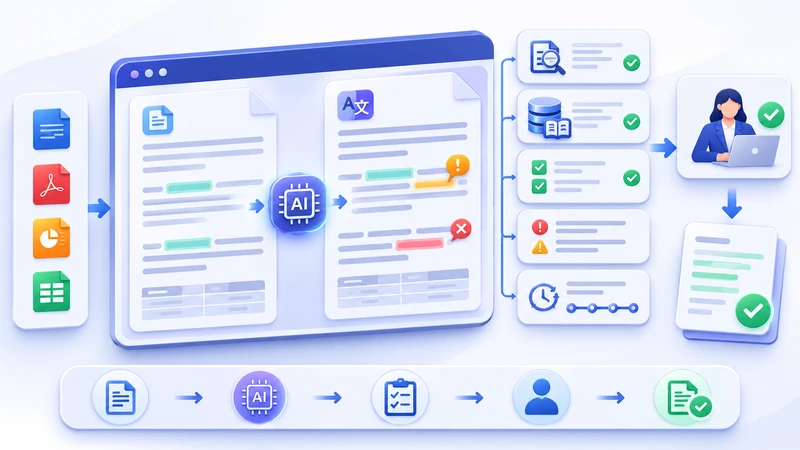
For a business, successful translation depends on the entire process: preparing content, generating translations, applying approved terminology, protecting confidential information, checking quality, and delivering usable multilingual content.
A standalone translator may be sufficient for occasional internal documents. A cloud translation API may be more appropriate for automated product workflows. A TMS can provide the coordination needed for continuous multilingual publishing.
Before making a purchase, compare the products within their proper categories, verify their published capabilities and contractual terms, and evaluate them against your own content and operating requirements.
That approach is more reliable than selecting a single tool based on a generalized ranking.
Research and product verification date: November 21, 2026. Product information is based on publicly available official documentation. No independent performance ranking or hands-on benchmark of the seven shortlisted products is claimed.